



Archify is an open-source Agent Skill that helps Cursor, Claude Code, Codex CLI, and OpenCode turn a codebase or system description into an interactive architecture diagram. The coding agent analyzes the available context and produces structured data; Archify validates the diagram rules and renders the result as a self-contained HTML file.
This is useful when a project changes faster than its documentation. Architecture diagrams are often needed for design reviews, pull requests, and handoffs, but manually rebuilding them in a separate drawing tool takes time and makes it easy for the documentation to fall behind.
Archify is not a browser-based drawing website and does not include a drag-and-drop canvas. It is designed for developers who already work with AI coding agents and want to create technical diagrams inside the same workflow.
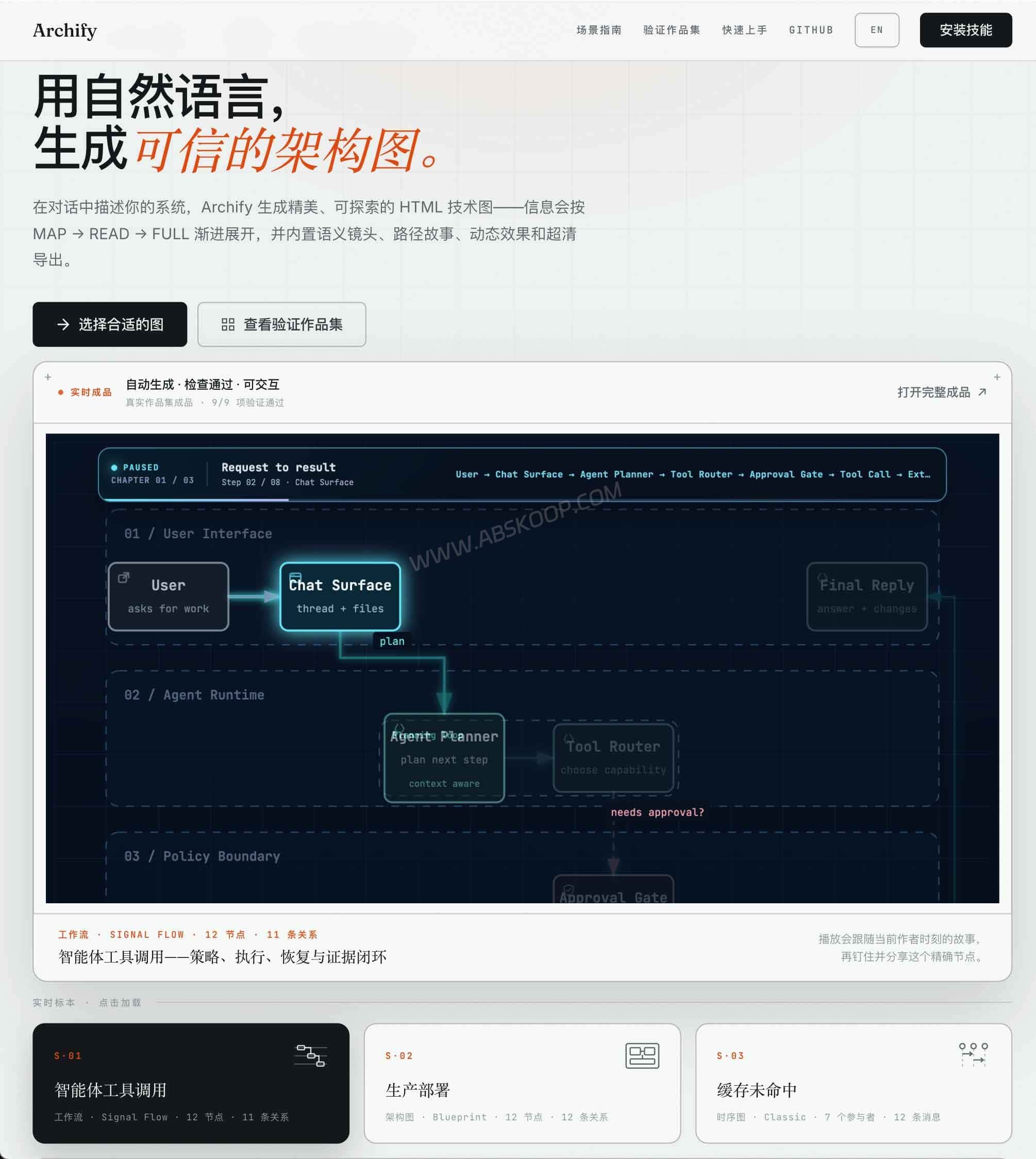
After installation, you can ask the agent to analyze the current repository and create a runtime architecture diagram. The model organizes the code into a typed intermediate representation, while Archify handles diagram validation and rendering.
What Is Archify and How Is It Different from Online Diagram Tools?
Archify works differently from online tools that ask you to paste a GitHub repository URL. It runs mainly as an Agent Skill inside Cursor, Claude Code, Codex CLI, or OpenCode, and it also includes a Node.js command-line tool for validation and rendering. Archify does not contain its own large language model.

When you ask it to analyze a repository, the model used by the host agent reads the files it is allowed to access and produces typed JSON IR, or intermediate representation. Archify receives that structured description, checks its schema, layout, and routes, and compiles it into an interactive HTML diagram.
You can also start without a repository by describing the system, components, and connections in chat. Whether source code is sent to a cloud model depends on the agent, model provider, and privacy settings you use.
The agent reads an accessible codebase or system description → the model creates typed JSON IR → Archify checks the schema, layout, and routes → Archify renders an interactive HTML diagram.
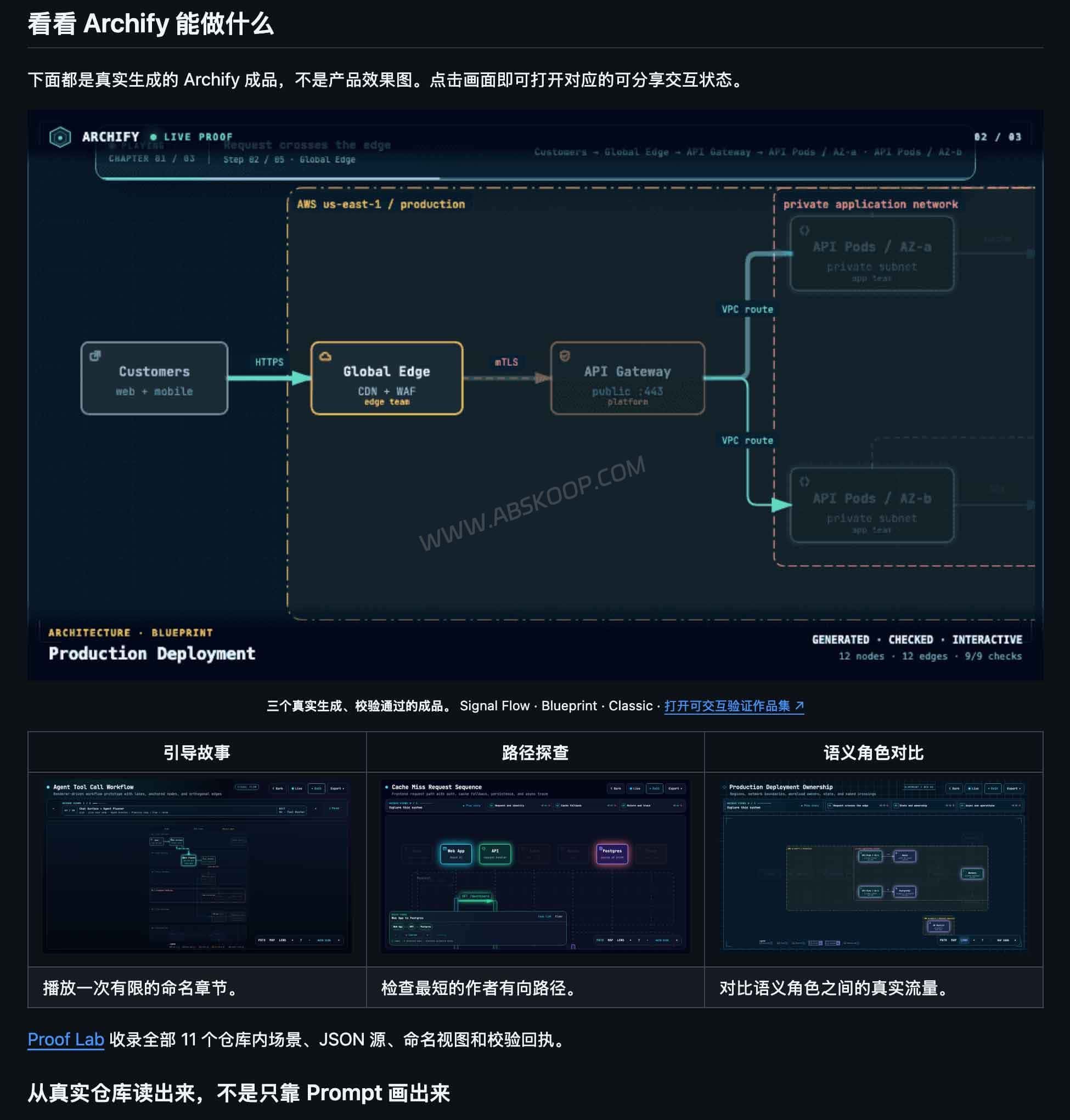
How Does Archify Generate and Validate Interactive Architecture Diagrams?
Archify checks the typed JSON IR before producing the final diagram. Its validation covers the schema, component placement, HTML and SVG output, connection routes, and the spacing between labels and routes.
If a check fails, the tool returns the relevant rule, affected object, and supported repair information. This allows the agent to adjust the problematic part instead of rebuilding the entire diagram without knowing what went wrong.
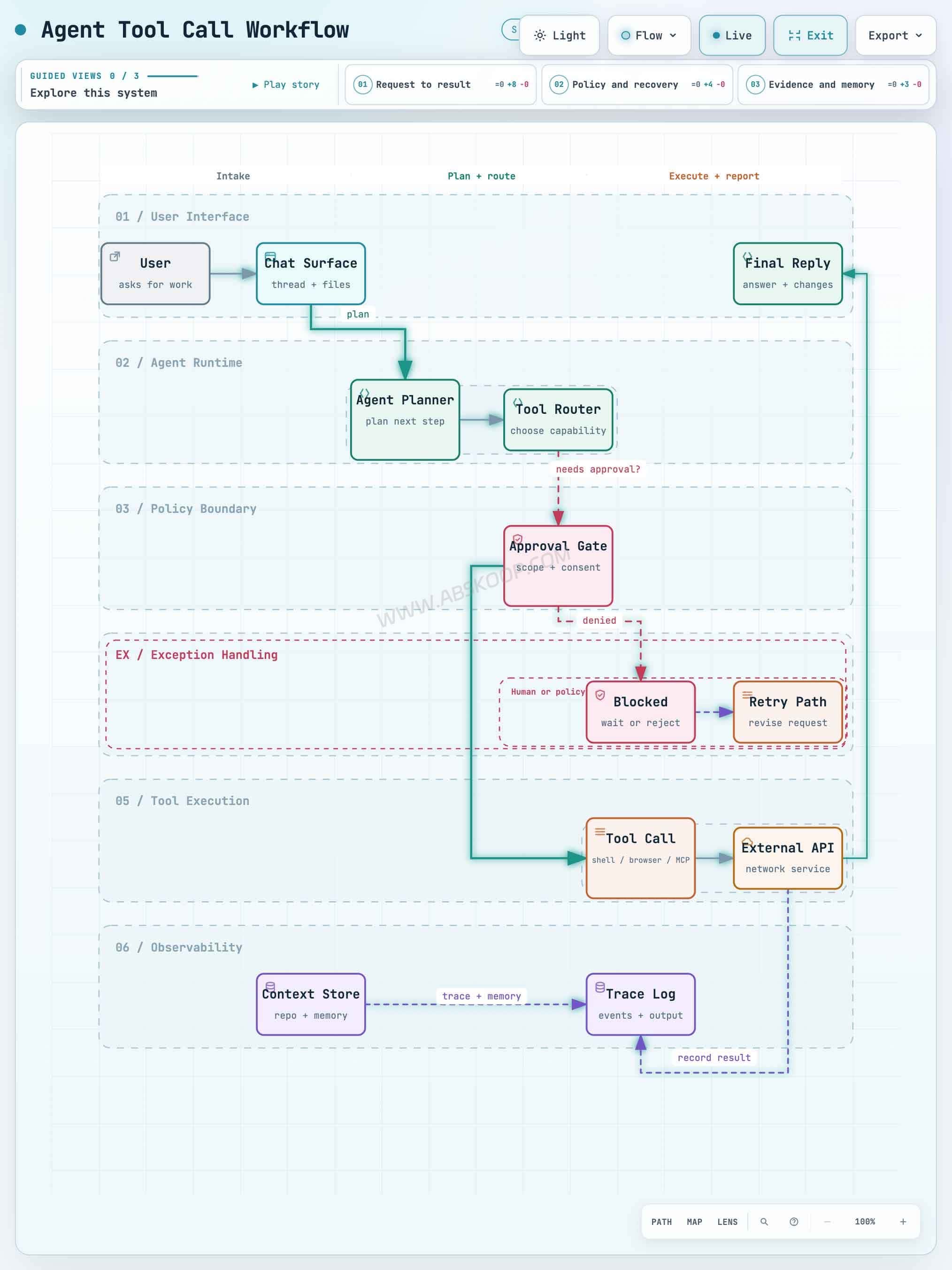
Preview is an optional local authoring mode that reloads only verified revisions and keeps the last valid diagram visible when a new edit fails. Deliver checks a candidate file before it replaces the existing output.
These checks help prevent broken files, invalid layouts, and routing conflicts. They do not independently verify whether the services and relationships shown in the diagram match a live production system. Those details still come from the system description or the agent’s interpretation of the available code.
Supported Diagram Types and Export Formats
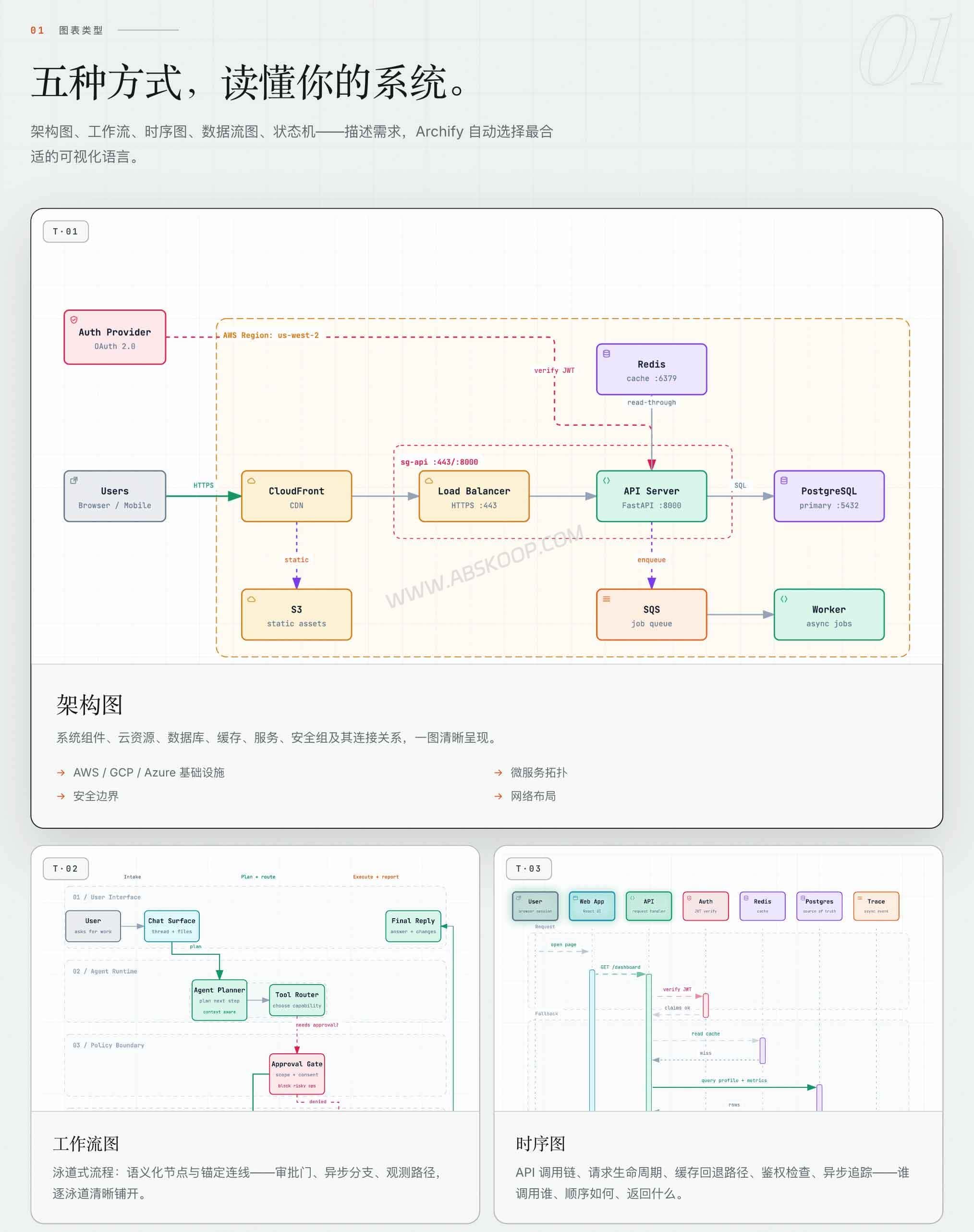
Archify supports five diagram types for different engineering and documentation tasks:
- Architecture diagrams: Show services, databases, caches, external systems, infrastructure, and security boundaries.
- Workflow diagrams: Map CI/CD pipelines, approval flows, operational procedures, and agent tool calls.
- Sequence diagrams: Explain API requests, authentication, cache fallbacks, asynchronous calls, and response order.
- Data flow diagrams: Track data sources, transformations, storage, PII boundaries, and downstream consumers.
- Lifecycle diagrams: Display states, events, waiting periods, retries, cancellations, and terminal outcomes.
The main deliverable is a self-contained HTML file that can be opened directly in a browser. The viewer supports dark and light themes, node search, upstream and downstream tracing, exact route inspection, and guided views.
Static diagrams can be exported as PNG, JPEG, WebP, or SVG. When motion is enabled, Archify can also export a WebM animation.
How to Install and Use Archify with Claude Code, Codex, and Cursor
The complete local rendering, validation, and export workflow requires Node.js and a compatible environment such as Cursor, Claude Code, Codex CLI, or OpenCode.
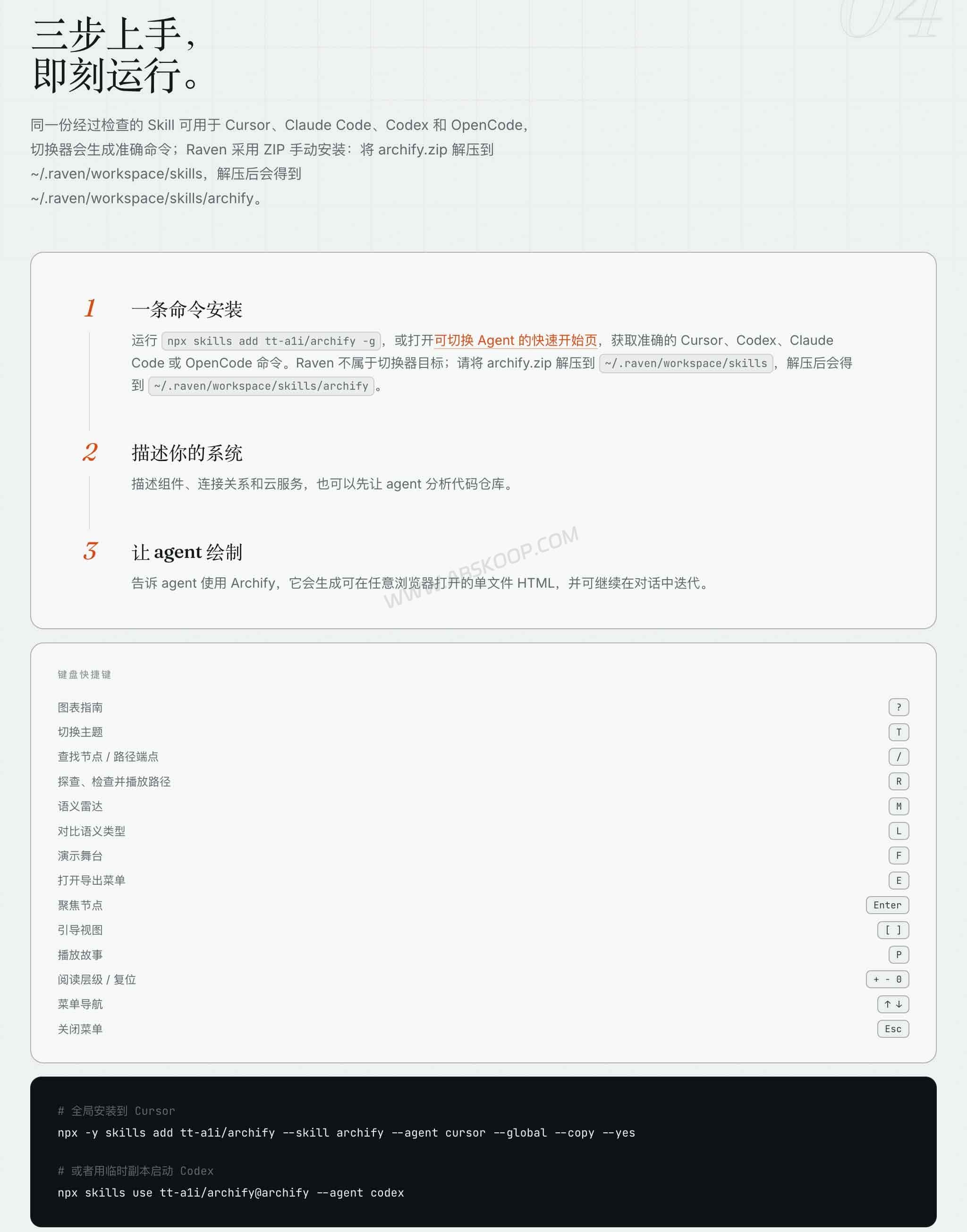
To install Archify globally, run:
npx skills add tt-a1i/archify -gTo try it temporarily with Codex CLI without installing a permanent copy, use:
npx skills use tt-a1i/archify@archify --agent codexOpen your coding agent in the project directory and give it a focused request:
Analyze the current repository, then use Archify to create a high-level runtime architecture diagram.A repository is not required. You can describe a system directly:
Use Archify to draw this flow: Browser -> API -> Redis cache -> PostgreSQL fallback.Archify can also be uploaded to Claude.ai through Settings → Capabilities → Skills. Whether the complete renderer and validator work there depends on Node.js access inside the Claude.ai sandbox.
Uploading archify.zip to Project Knowledge is a separate option. It provides a prompt-driven architecture fallback, not the complete local rendering and validation workflow. Raven supports the full workflow through a manual ZIP installation.
Archify vs GitDiagram vs Mermaid: Which One Should You Use?
All three tools can produce technical diagrams, but they begin from different inputs and serve different workflows. Archify works inside an AI coding agent, GitDiagram starts from a GitHub repository URL, and Mermaid renders diagrams from text syntax.
| Comparison | Archify | GitDiagram | Mermaid |
|---|---|---|---|
| Product type | Agent Skill with a local Node.js validator and renderer. | Online visualization tool for GitHub repositories. | Open-source text-to-diagram syntax and renderer. |
| Main input | A system description or a codebase accessible to the host agent. | A GitHub repository URL, repository tree, and README. | Mermaid source written by a user or generated by an AI model. |
| Generation process | The agent creates typed JSON IR; Archify validates and renders it. | A model creates a graph AST, which is checked and compiled into Mermaid. | The renderer parses Mermaid syntax and produces a diagram. |
| Main output | Interactive self-contained HTML, plus PNG, JPEG, WebP, SVG, and WebM exports. | An interactive repository-linked diagram with Mermaid and PNG export options. | Diagrams suitable for Markdown files, documentation, and websites. |
| Best suited for | Developers who already use coding agents and need several kinds of interactive technical diagrams. | People who want to explore the structure of an unfamiliar GitHub repository quickly. | Teams that want lightweight diagrams stored and versioned alongside their documentation. |
Choose GitDiagram when you want to inspect a GitHub project from its URL. Choose Mermaid when the diagram needs to live inside Markdown or source-controlled documentation. Archify makes more sense when you already use Claude Code, Codex, or Cursor and want the agent to produce an interactive architecture, workflow, sequence, data flow, or lifecycle diagram.
Who Is Archify For? Limitations and Privacy Considerations
Archify is primarily a companion tool for AI coding agents, not a replacement for a general-purpose drawing application.
- No drag-and-drop canvas: You normally refine a diagram by asking the agent to move nodes, change colors, or adjust routes. You can also edit the JSON source directly. For precise mouse-based layout control, draw.io or Lucidchart is a better fit.
- “Zero dependencies” applies to the generated HTML: The exported HTML file needs no server or external runtime. Creating it still requires Node.js, a compatible agent, and potentially paid model usage.
- Source-code handling depends on the host agent: Archify does not include an LLM. Whether code is sent to a cloud provider depends on your agent, model service, and configuration. Generated diagrams may also expose internal service names or file paths, so review them before external sharing.
- Optional update check: Archify may retrieve a fixed stable manifest to display an update reminder. According to the project documentation, this request does not send project data, prompts, account identifiers, or device identifiers. It can be disabled with
ARCHIFY_UPDATE_CHECK_DISABLED=1. - No hosted collaborative editor: Archify produces portable files but does not provide an online whiteboard, comments, or simultaneous multi-user editing.
- Still in development: The official project page listed
v2.17.0-dev.1as the current development version on September 8, 2026. Commands, integrations, and viewer features may continue to change.
Archify is a good fit if you already use Claude Code, Codex, Cursor, OpenCode, or Raven and regularly need diagrams for reviews, pull requests, or technical handoffs. Mermaid or a traditional visual editor will usually be quicker for a simple one-off flowchart or real-time team editing.
If you prefer a visual canvas where nodes and connections can be edited directly, see our guide to Next AI Draw.io, a conversational diagramming tool.
Archify FAQ
Is Archify free?
Yes. Archify is released under the MIT License, so its code can be used, modified, and distributed for free. The model used by your host agent may still consume paid API credits or subscription allowances.
Can I use Archify without Cursor or Claude Code?
Yes. The complete workflow also supports Codex CLI, OpenCode, and Raven. The project includes a Node.js CLI for validating and rendering diagram sources.
Can Archify import an existing Mermaid diagram?
Archify does not include a general-purpose automatic Mermaid parser. A capable host agent may be able to read Mermaid source and rewrite it as Archify JSON IR, but that conversion is performed by the model rather than a native Archify import feature.
Does Archify update a diagram automatically when the code changes?
No. You need to ask the agent to analyze the updated codebase and generate a new diagram. For architecture diagrams, Archify can compare two validated snapshots and show added, removed, changed, moved, and rerouted elements.
Can Archify diagrams be viewed offline?
Yes. The generated HTML is self-contained and can be opened locally in a browser without a server or additional runtime.
Archify Source Code and Official Documentation
Archify GitHub repository — source code, installation instructions, changelog, and MIT License.
Archify official project page — interactive examples, diagram types, export formats, and quick-start guide.
GitDiagram GitHub repository — technical details used in the comparison above.
Mermaid documentation — official syntax and rendering documentation.


Comments (0)