



If a player expects an M3U playlist but the list you have is a TXT file, you do not need to rebuild it line by line. A simple TXT to M3U converter can turn the text list into an M3U playlist that can be imported into compatible players.
The tool used here works both ways: TXT to M3U and M3U back to TXT. According to its website, conversion happens locally in the browser and the file is not uploaded or stored.
Tool: TXT / M3U Playlist Converter
What Is the Difference Between TXT and M3U?
The TXT format used by this converter is not just a random text file full of URLs. It expects a simple playlist structure, usually with a name followed by a media URL.
A basic TXT list looks like this:
Demo 1,https://example.com/live1.m3u8
Demo 2,https://example.com/live2.m3u8
After conversion, the M3U version looks more like this:
#EXTM3U
#EXTINF:-1,Demo 1
https://example.com/live1.m3u8
#EXTINF:-1,Demo 2
https://example.com/live2.m3u8
The media URLs stay the same. What changes is the playlist structure: M3U adds tags such as #EXTM3U and #EXTINF so compatible players can read the list properly.
How to Convert TXT to M3U Online
Open the TXT to M3U converter, choose the encoding used by your TXT file, then select the playlist you want to convert.
- Prepare the TXT playlist in the format expected by the converter.
- Select the correct text encoding. UTF-8 is a good place to start for most modern files.
- Choose the TXT file from your device.
- Run the TXT to M3U conversion.
- Check the names, groups and URLs in the result before importing it into a player.
There is one catch: the converter itself says it does very little error handling. If the output looks wrong, check the commas, line breaks, group names and encoding in the original TXT file before blaming the player.
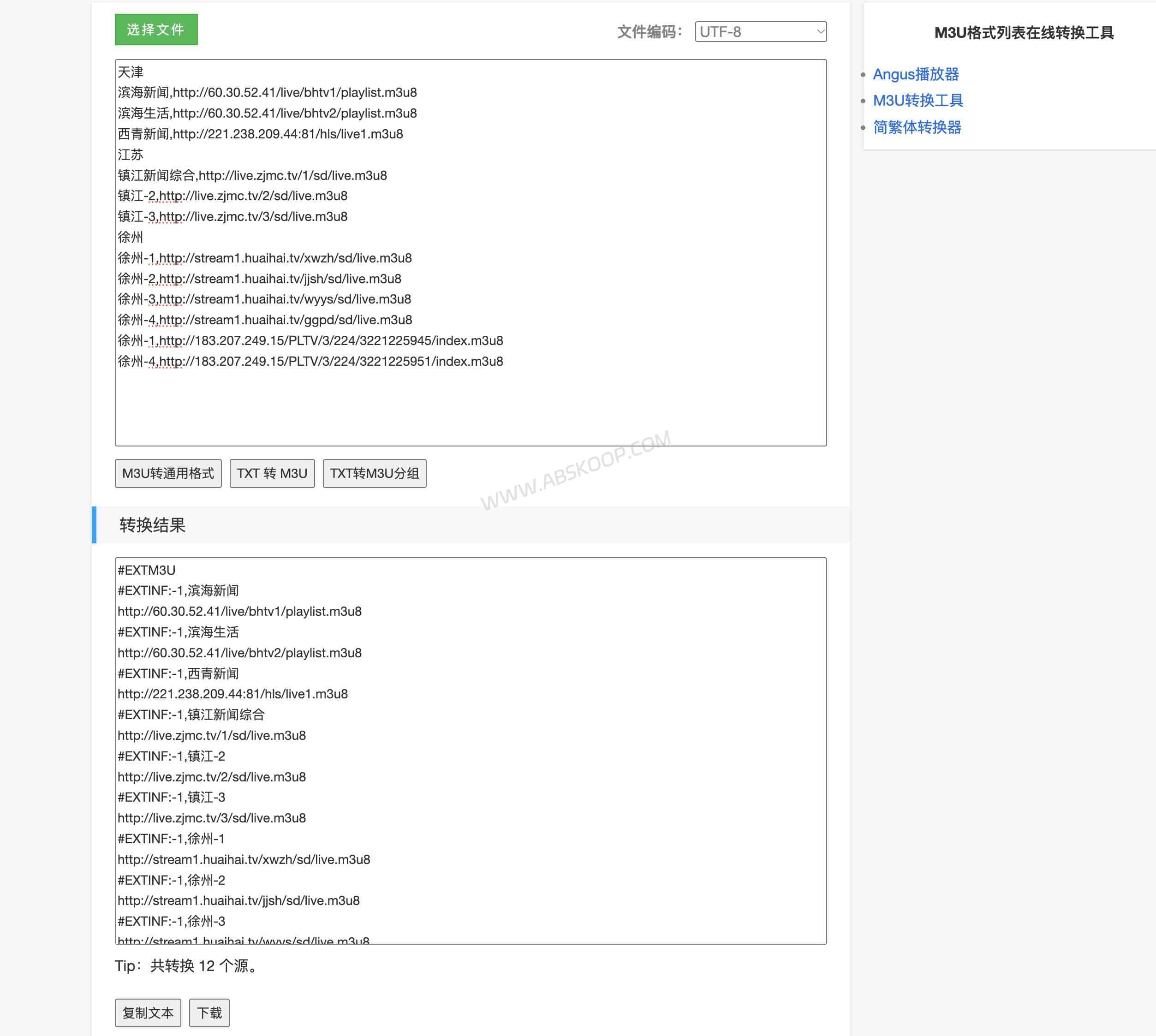
How Should the TXT Playlist Be Formatted?
The format shown on the Sankei tool page is straightforward: put the group name on its own line, then list the entries underneath as Name,URL.
For example:
News
Demo News 1,https://example.com/news1.m3u8
Demo News 2,https://example.com/news2.m3u8

Sports
Demo Sports 1,https://example.com/sports1.m3u8
For this particular converter, it is better to follow that structure instead of mixing in playlist syntax from other tools.
What About the #genre# TXT Format?
You may also come across TXT playlists that group entries like this:
News,#genre#
Demo News 1,https://example.com/news1.m3u8
The #genre# pattern is used by some playlist tools, scripts and players, but it is not the grouping format shown in Sankei’s current example.
If your TXT file uses #genre#, do not assume this converter will interpret it correctly. Converting the list to the tool’s expected group-name format first is the safer option.
What Do group-title, tvg-id and tvg-logo Mean in M3U?
Some M3U playlists contain much more metadata than the basic example above:
#EXTM3U
#EXTINF:-1 tvg-id="demo.news" tvg-name="Demo News" tvg-logo="https://example.com/logo.png" group-title="News",Demo News
https://example.com/news.m3u8
Those extra fields are commonly used by playlist applications:
group-titlegroups entries into sections such as News or Sports.tvg-idis often used to match an entry with an EPG record.tvg-namestores a display name.tvg-logopoints to a logo image.
A basic media player may not need any of them. Apps with EPG support, channel groups or artwork are more likely to use this metadata.
The Sankei page only states that it converts between its general TXT format and M3U. It does not document whether every extended M3U field is preserved. If your original playlist contains EPG IDs, logos or other custom tags, keep a backup before converting it.
Can You Convert M3U Back to TXT?
Yes. The same tool also converts M3U back to its TXT playlist format.
TXT can be easier to work with when you want to rename entries, reorganize groups or inspect URLs in a text editor. Once the list is cleaned up, you can convert it back to M3U for use in a player.
Why Does the Converted M3U Playlist Not Work?
| Problem | Likely Cause | What to Check |
|---|---|---|
| No usable output is generated | The TXT structure does not match the expected format | Check commas, line breaks and group formatting |
| Names contain garbled characters | The wrong text encoding was selected | Try UTF-8 or the encoding used by the original file |
| The player does not recognize the M3U file | The extension or playlist structure is wrong | Make sure the file ends in .m3u, not .m3u.txt |
| The playlist opens, but some entries do not play | The corresponding URLs are unavailable or restricted | Test the affected URL directly in a media player |
| The player returns 401 or 403 | The URL requires authentication, a token, cookie or signed request | Check whether the URL has expired or requires authorization |
| The same entry fails in multiple players | The URL or server is more likely to be the problem | Test the media URL itself instead of repeatedly converting the playlist |
How Do You Open an M3U File After Conversion?
Once the conversion is finished, the M3U file can be opened with players such as VLC, PotPlayer or IINA. VLC is available across several platforms, while IINA is a good fit for macOS.
On iPhone, iPad and Android, you can also use apps that support M3U and M3U8 playlists.
If you already have the English version of our M3U/M3U8 player guide, link it here with an anchor such as how to open M3U and M3U8 files.
Does the TXT to M3U Converter Upload Your Playlist?
The tool page states that conversion is performed locally and that playlist data is not uploaded or stored.
That does not make every playlist safe to share. A URL may still contain a token, signed parameter, account identifier or other temporary credential. If it does, keep the playlist private even when the conversion itself happens locally.
TXT to M3U FAQ
Can I just rename a .txt file to .m3u?
Only if the TXT file already contains valid M3U syntax. Renaming a simple Name,URL text list does not automatically add the #EXTM3U and #EXTINF tags expected by an M3U playlist.
Does an M3U file contain the actual video or audio?
Usually not. An M3U file is a text-based playlist that points to local media files or network URLs. The media itself remains at those locations.
Why are names broken after TXT to M3U conversion?
That is usually an encoding problem. Check the encoding of the original TXT file and select the matching option before converting it again.
What is the difference between M3U and M3U8?
M3U8 is an M3U-style playlist encoded as UTF-8 and is commonly used for HLS streaming. M3U is the broader playlist format and is also widely used for local and network media lists.


Comments (0)