



You can run Android apps on Mac without booting a full Android virtual machine, but there is a catch: the app still needs a compatibility layer that understands Android APIs.
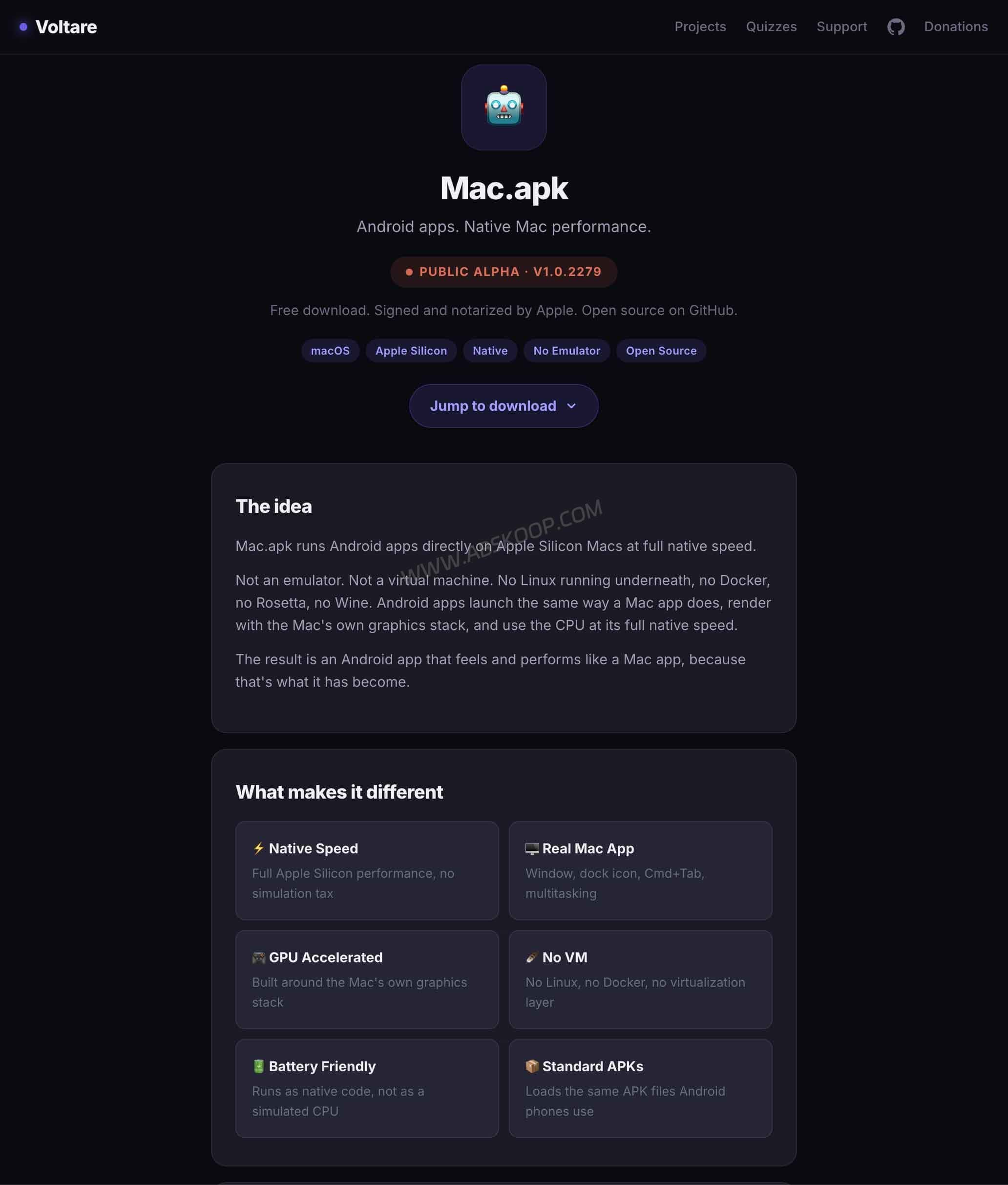
Mac.apk takes that approach. Instead of launching a complete Android system in the background, it provides the runtime pieces Android apps need and runs them as regular macOS processes.
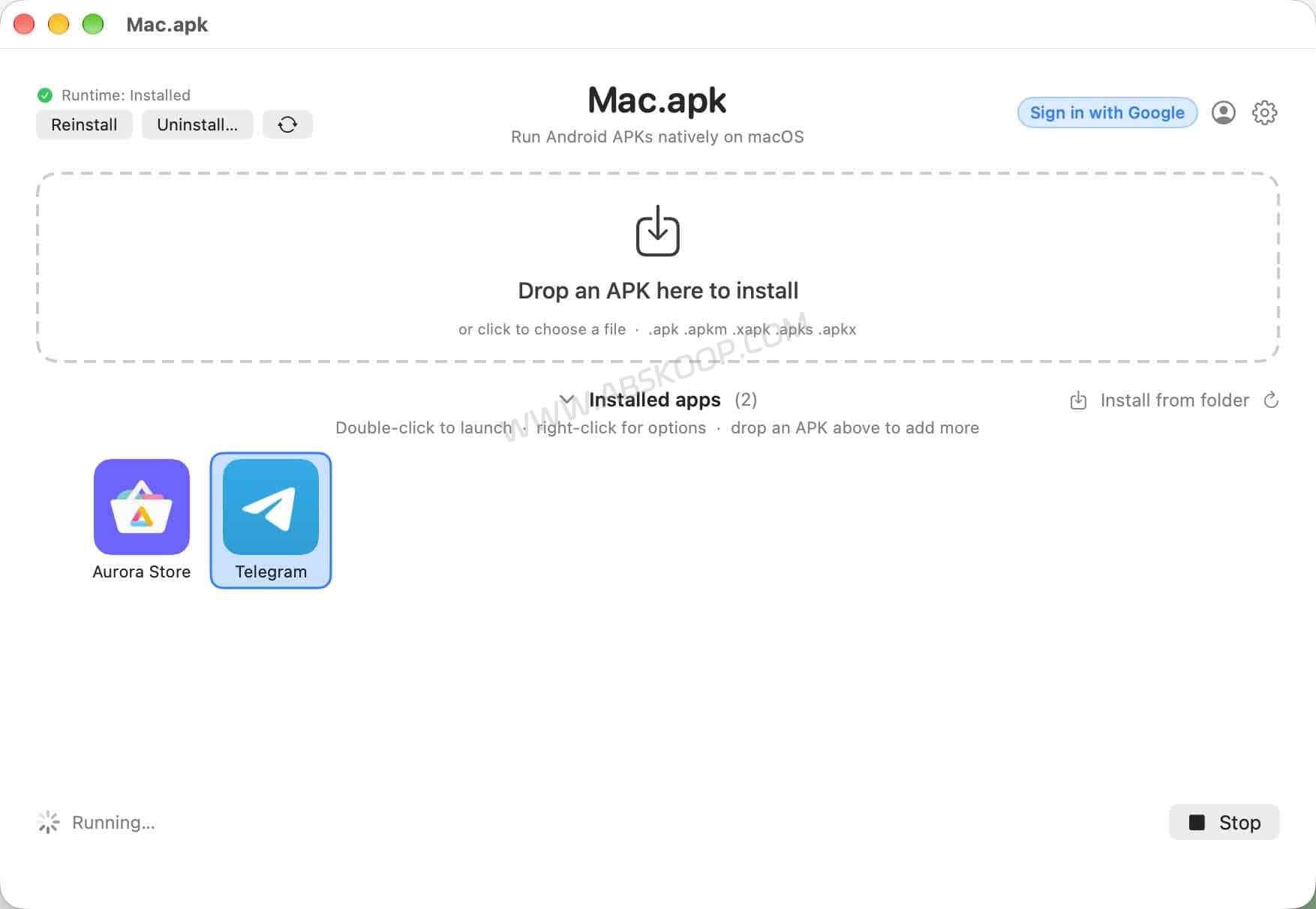
Installed apps get their own windows, show up in the Dock, and can be switched with Command + Tab. For someone who only needs a few specific Android apps on a Mac, that feels a lot closer to using normal Mac software than opening an emulator first.
Mac.apk is still an Alpha project, though. It only supports Apple Silicon and recent versions of macOS, and some apps still run into login, Google services, or other compatibility problems. If you need a complete and predictable Android environment, a mature emulator is still the easier option.
How does Mac.apk run Android apps on Mac without an emulator?
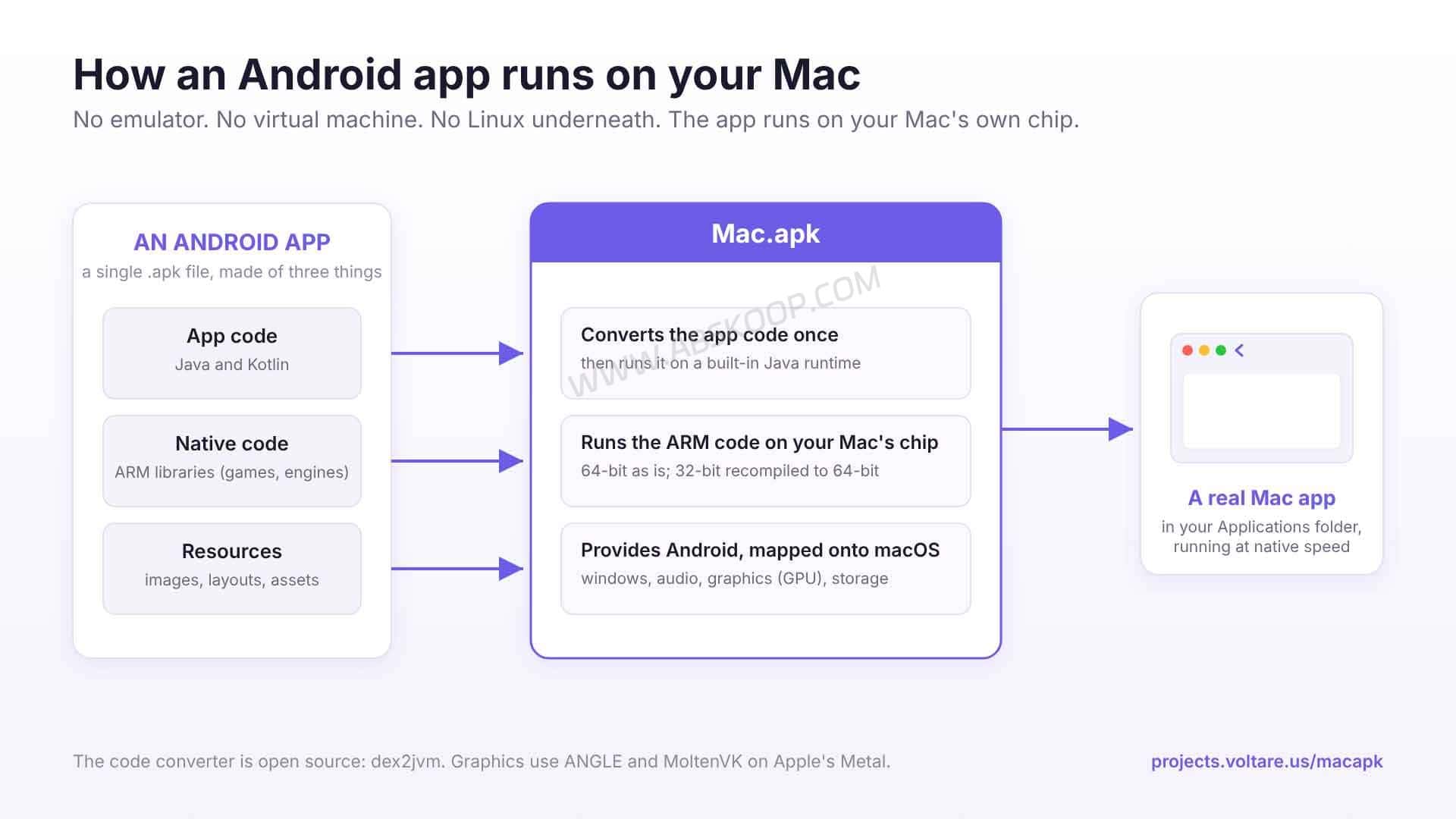
Mac.apk does not start an Android emulator, a virtual machine, Linux, or a complete Android operating system in the background.
A better way to think about it is as an Android compatibility environment for macOS.
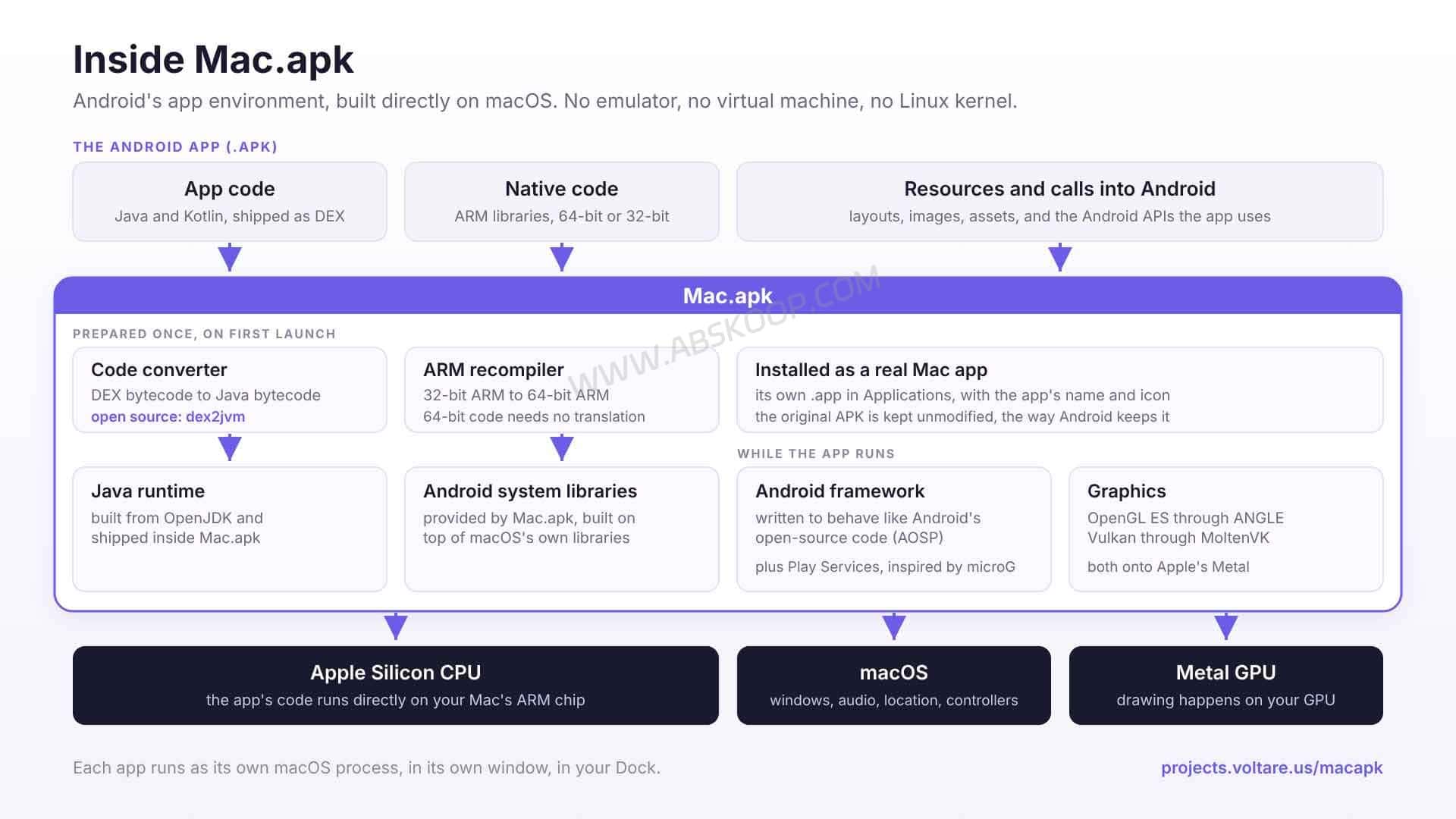
Java, Kotlin, and native ARM code inside an Android app are handled by Mac.apk’s runtime and compatibility layer. Parts of the Android Framework are reimplemented, while system and graphics functions are mapped to their macOS equivalents.
64-bit ARM native code can run directly on Apple Silicon. 32-bit ARM code has to be translated first. For graphics, Mac.apk uses components such as ANGLE and MoltenVK to bridge APIs including OpenGL ES and Vulkan to the macOS graphics stack.
That design is also one reason the project is focused on Apple Silicon rather than Intel Macs.
In practical terms, a traditional Android emulator behaves more like another Android device running inside your Mac. Mac.apk tries to connect the Android app itself to macOS instead.
Mac.apk system requirements
The hardware requirements are fairly strict.
Mac.apk currently requires an Apple Silicon Mac running macOS 26.4 Tahoe or later. Intel Macs are not supported.
That means Macs based on M1, M2, M3, M4 and newer Apple Silicon generations are the intended hardware.
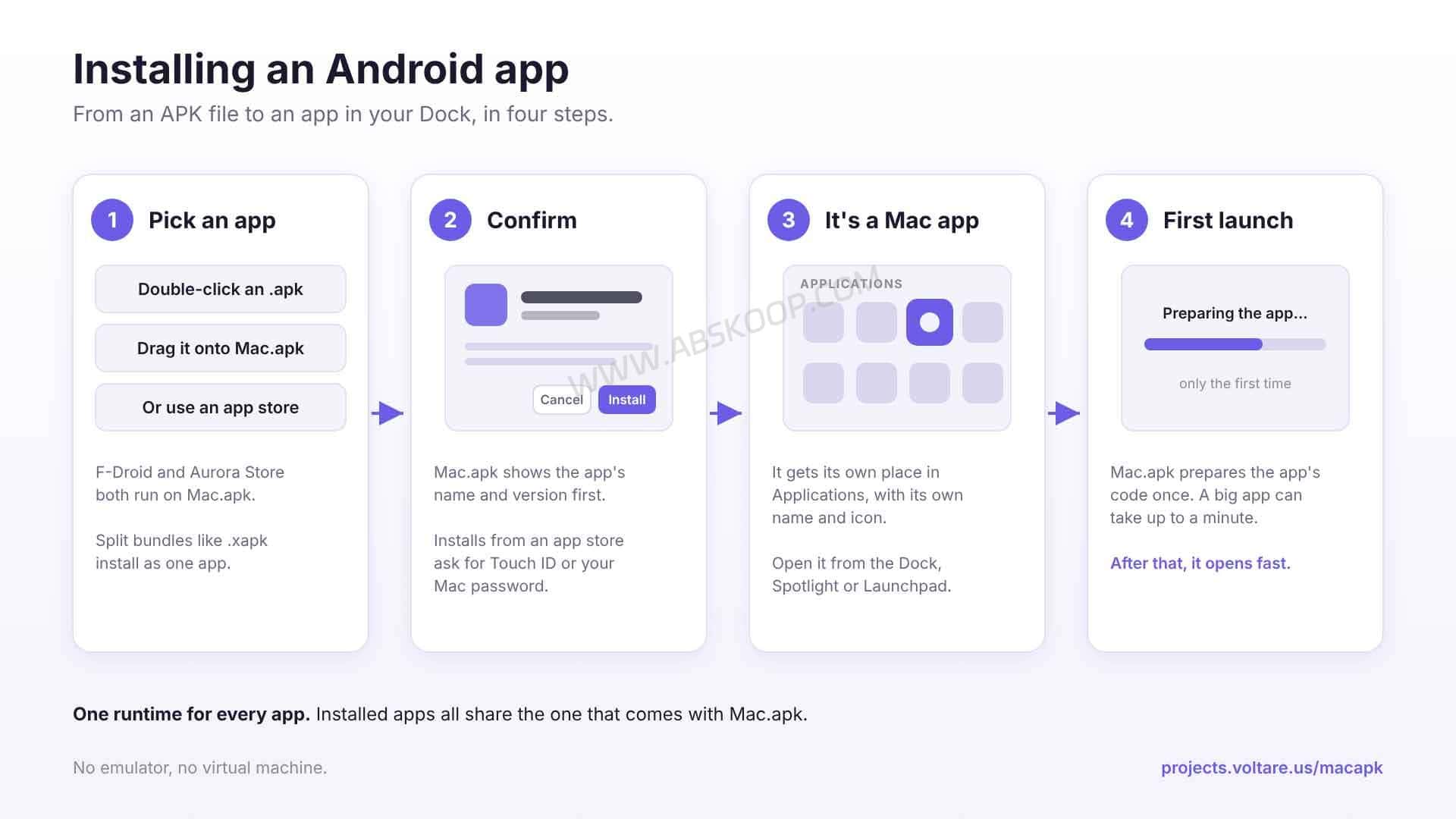
After installing Mac.apk, you also need to install its Runtime. The first launch of an Android app may take noticeably longer because Mac.apk has to prepare and convert parts of the app before it can run.
Disk usage is also higher than the original APK size. According to the project documentation, an installed app typically takes around 1.5 to 3 times the size of its APK once converted code, native libraries, and app data are included.
How to install APK files on Mac with Mac.apk
The installation process is much simpler than the architecture behind it.
Download the DMG from the project’s GitHub Releases page, move Mac.apk into Applications, and open it. The first time you use it, install the Runtime from inside the app.
You can then set Mac.apk as the default application for Android packages or simply drag a package into its window.
Mac.apk supports more than standard .apk files. It currently handles .apkm, .xapk, .apks, and .apkx packages as well.
That matters because many Android apps are no longer distributed as a single APK. Split packages and store-specific package formats are increasingly common.
Being able to install an app does not mean it will work correctly.
Android apps may depend on Google Play Services, device authentication, cameras, sensors, DRM, anti-cheat systems, or manufacturer-specific APIs. Mac.apk does not yet reproduce every part of the Android platform.
So the useful question is not simply whether Mac.apk can open a certain package format. It is whether the specific app you want has already been shown to work.
Which Android apps currently work with Mac.apk?
The project maintains a Compatibility List with individual app results and known issues.
As of October 20, 2026, the list contains 71 tested Android apps: 58 are marked as working, 10 as partially working, and 3 as not currently working.
Apps and games listed as working include Minecraft, Telegram, Signal, VLC, F-Droid, Aurora Store, Epic Games Store, Subway Surfers, Candy Crush Saga, and Rocket League Sideswipe.
Minecraft has been tested with Xbox sign-in and multiplayer servers. Rocket League Sideswipe can be installed through Epic Games Store and has been tested with controllers and online matches. Telegram, Signal, and VLC are also in the working group.
That does not mean Android compatibility is close to complete.
Instagram still has layout, video, and audio issues. Reddit has problems with Google sign-in and scrolling, while Duolingo has had account creation or login problems.
Different versions of the same app can also behave differently. The compatibility list changes quickly, so it is best treated as a snapshot of the current state rather than a long-term guarantee.
If you have one specific app in mind, check the latest Mac.apk Compatibility List before installing anything.
What about Google Play apps?
Mac.apk does not include a complete Google Play Store environment, but you do not have to find every APK manually.
The project has tested F-Droid, Aurora Store, and Epic Games Store.
Aurora Store is especially useful because it can access the Google Play app catalog. That gives you a way to download many Android apps that do not provide standalone APK files on their own websites.
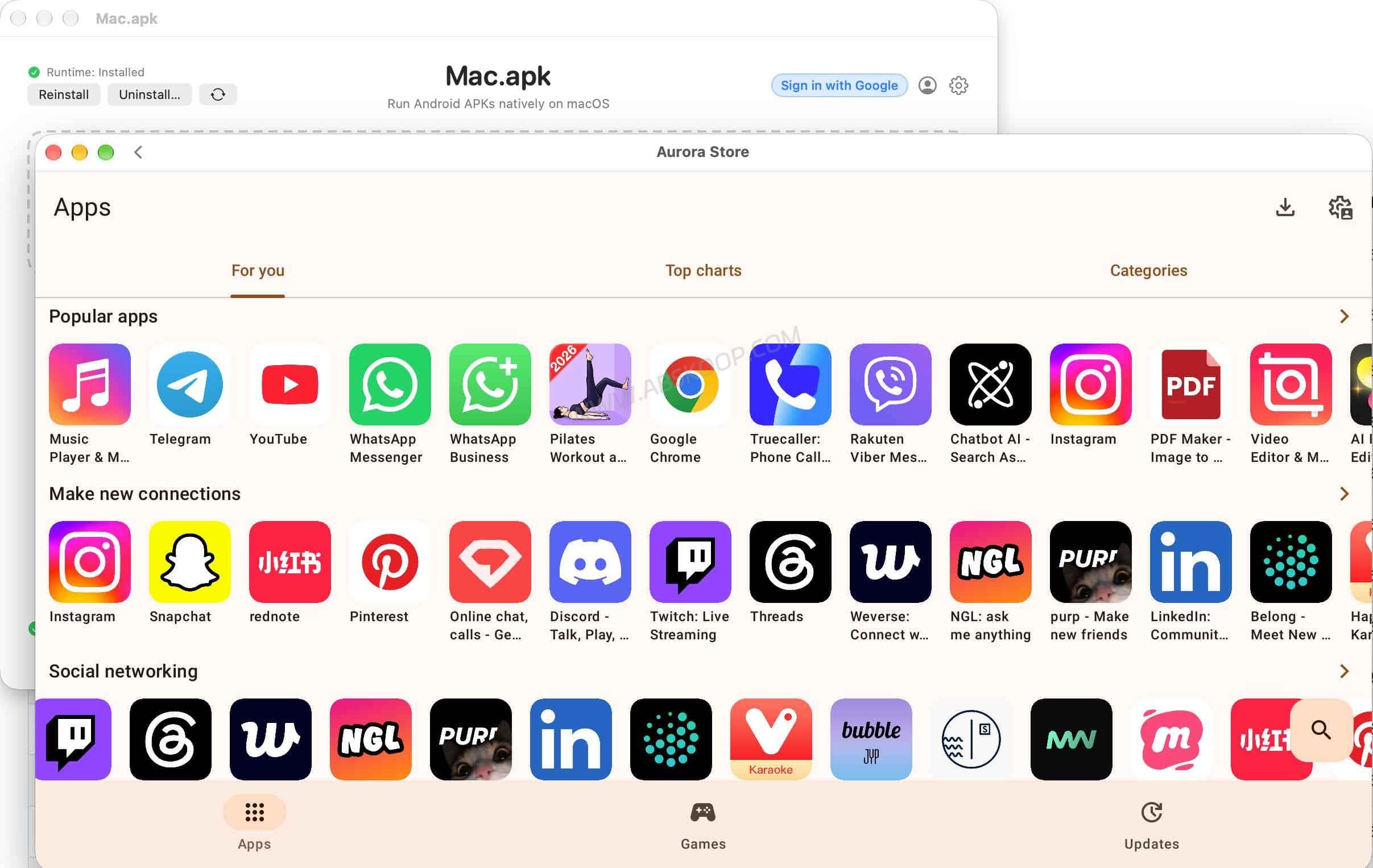
There is an important distinction, though: being able to download an app from the Google Play catalog does not mean Mac.apk provides a complete Google Play environment.
Apps that rely on Google Play Services, Play Integrity, device certification, payments, or anti-cheat systems may still fail to run or lose important features.
Fortnite is one example currently listed as unsupported because of its anti-cheat requirements. Mac.apk does not attempt to bypass those checks.
Mac.apk vs Android emulators for Mac
| Feature | Mac.apk | Traditional Android emulator |
|---|---|---|
| Full Android system | No | Usually |
| Virtual machine | No | Common |
| Install APK files | Yes | Yes |
| Separate macOS windows | Yes | Depends on the product |
| Apple Silicon support | Yes | Depends on the product |
| Intel Mac support | No | Some products |
| Full Google Play environment | No | Available in some emulators |
| Maturity | Alpha | Mainstream products are more mature |
The main difference is straightforward: Mac.apk does not need to boot a complete Android system just to run one Android app.
If you only need a Mac version of one or two Android-only tools, that approach can be appealing.
If you want game multi-instance features, advanced key mapping, virtual location, a full Google Play environment, or broad app compatibility, a mature Android emulator is still the safer choice.
The biggest Mac.apk caveat is security, not compatibility
On a normal Android device, apps generally run inside their own application sandboxes. Android controls file access, process isolation, and how much one app can see of another app’s data.
Mac.apk does not currently give Android apps the same system-level sandbox they would have on an Android phone.
Apps running through Mac.apk use the permissions of the current macOS user. Mac.apk keeps some Android-style permission behavior, but that is not the same thing as full application isolation.
In other words, an APK should be treated more like software you are about to run on your Mac, not as something that is automatically safer because it originally came from Android.
Stick to apps from developers and stores you trust. Avoid modified, cracked, or repackaged APKs from unknown sources.
Is Mac.apk open source?
Yes. The main Mac.apk repository is public and currently uses the AGPL-3.0 license.
For developers, the interesting part is that the repository includes core pieces such as the Runtime, Android Framework compatibility work, and ARM translation code rather than only a thin desktop wrapper.
If you are simply downloading the official build for personal use, the licensing details are unlikely to matter much. If you plan to modify the code, redistribute it, or use it inside a commercial product, check the latest LICENSE and commercial licensing terms in the project repository.
Who should try Mac.apk?
Mac.apk makes the most sense if you already use an Apple Silicon Mac and have a specific Android app that does not have a native macOS version.
It is also an interesting project for developers who want to see how an Android compatibility layer can be built on top of macOS.
If stability is the priority, there is no reason to uninstall your existing emulator yet.
Mac.apk is still Alpha software. Some apps have incomplete sign-in flows, parts of the Android API are still missing, and Google Play Services or anti-cheat requirements remain a problem for certain apps.
Mac.apk can already run a useful selection of Android apps, but it is still far from a “install anything and it just works” solution.
FAQ
Is Mac.apk an Android emulator for Mac?
Not in the traditional sense. Mac.apk does not boot a complete Android operating system or conventional virtual machine. It provides a compatibility environment that allows supported Android apps to run on macOS.
Can you run Android apps on Mac without an emulator?
Yes, but you still need a compatibility environment such as Mac.apk. It provides the runtime pieces Android apps need without starting a complete Android virtual machine. Compatibility still depends on the individual app.
Can a Mac open APK files directly?
macOS cannot run standard Android APK files on its own. With Mac.apk and its Runtime installed, supported APK, XAPK, APKM, APKS, and APKX packages can be opened and installed.
Does Mac.apk support Intel Macs?
No. Mac.apk currently requires Apple Silicon and macOS 26.4 Tahoe or later.
Can Mac.apk run apps from Google Play?
Some Google Play apps can be downloaded through Aurora Store, but Mac.apk does not provide a complete Google Play Services environment. Apps that depend on Play Integrity, device certification, Google services, payments, or anti-cheat systems may not work correctly.
Is Mac.apk safe?
There is no simple yes-or-no answer. Mac.apk itself is open source, but Android apps running through it do not receive the same sandboxing they would have on an Android phone. Only install APKs from sources you trust.
Should you install Mac.apk right now?
Mac.apk is already useful for Apple Silicon users who want to run a few Android apps that are known to be compatible, but it is not yet a general replacement for a full Android emulator.
If your needs are limited to a handful of specific apps, check the compatibility list and give it a try. If you depend on full Google Play support, game multi-instance features, or predictable long-term stability, a traditional emulator is still easier to live with.
Whether Mac.apk becomes an everyday tool will largely depend on how quickly app compatibility, isolation, and overall stability improve.
Official website: https://projects.voltare.us/macapk
GitHub: https://github.com/kksimp/Mac.apk
Compatibility list: Mac.apk Compatibility List
This article is based on the project’s public documentation and official compatibility list, checked in October 2026. Mac.apk is developing quickly, so system requirements, compatibility, and licensing details may change.


Comments (0)