



Editorial note: This guide is based on the official Invidious GitHub repository, documentation, FAQ, and public instance directory. Invidious is licensed under AGPL-3.0. Public instances are operated by third parties, so availability, logging policies, and playback behavior can vary from one server to another.
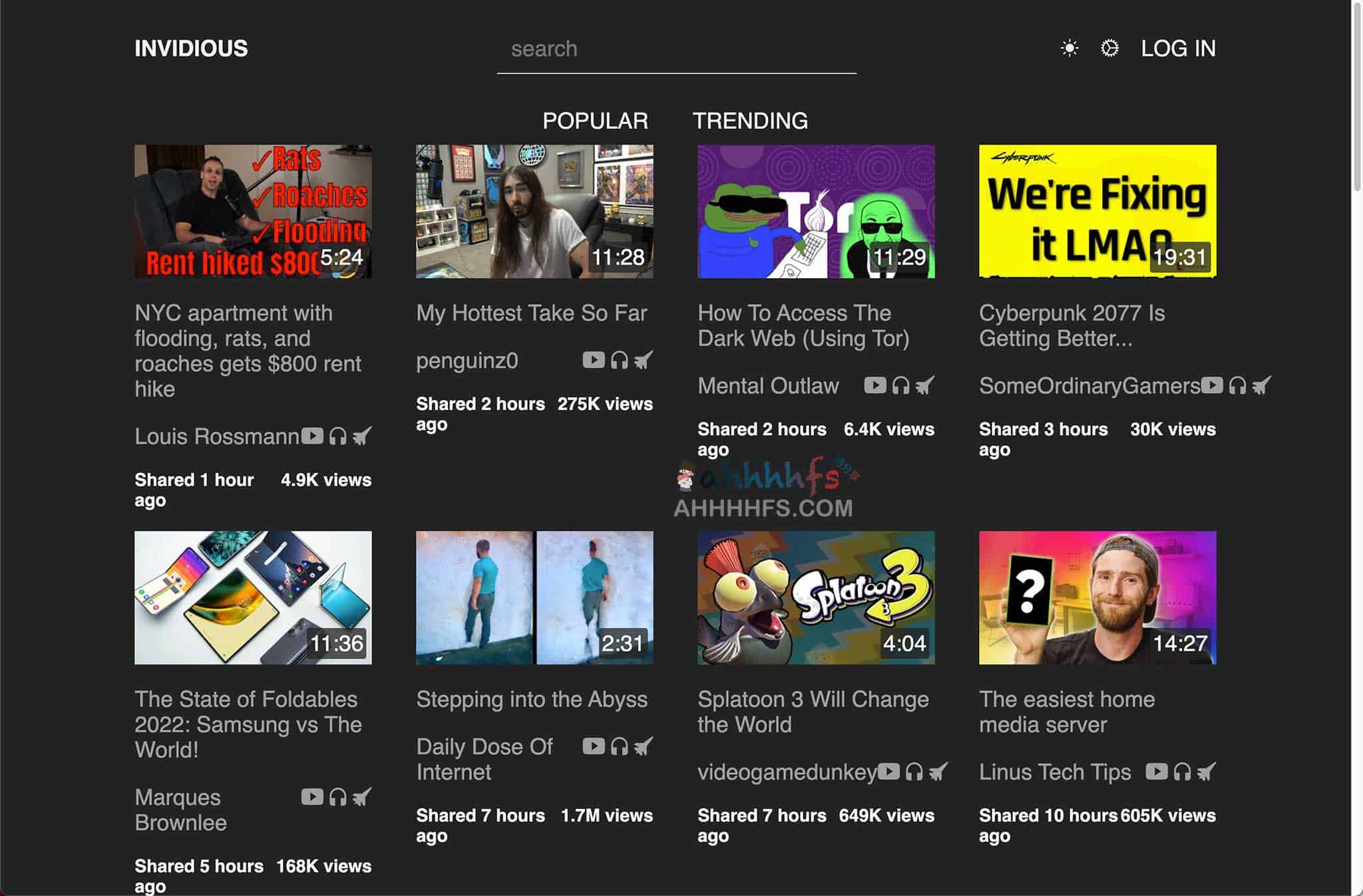
The Invidious YouTube frontend gives you another way to browse and watch public YouTube videos without using YouTube’s regular web interface.
It has a much lighter interface, does not require a Google account for basic browsing, and supports its own subscriptions, playlists, watch history, and data import/export. You can use a community-run public instance or host Invidious on your own VPS, NAS, or home server.
Invidious is sometimes described as a YouTube mirror, but that is not quite accurate. It does not keep a separate copy of YouTube. It is better understood as an open-source alternative frontend for YouTube.
What is the Invidious YouTube frontend?
Invidious replaces the regular YouTube website with its own interface while still working with videos hosted on YouTube.
That makes it useful for people who want a simpler web experience or prefer not to tie basic video browsing to a Google account.
Some of its more useful features include:
- Search and watch YouTube videos;
- Browse without signing in to Google;
- Manage channel subscriptions independently from Google;
- Create playlists and keep watch history;
- Import and export subscriptions and account data;
- Use an audio-only mode;
- Access a developer API;
- Run your own Invidious instance.
Where can you find public Invidious instances?
You do not need to host Invidious yourself just to try it. Community members run public instances that anyone can open in a browser.
The catch is that these servers come and go.
An instance may shut down, become overloaded, or run into problems communicating with YouTube. A list of Invidious sites published a year or two ago can therefore become outdated surprisingly quickly.
The safer place to start is the directory maintained by the Invidious project:
The list shows community instances that are currently accepted by the project. The number of available servers and their status can change over time.
These are not servers operated directly by the Invidious project. Each instance has its own administrator, infrastructure, and operating policies.
Why do Invidious instances stop working?
A public Invidious instance has to handle regular visitor traffic while also keeping up with changes on YouTube’s side.
Problems with server IP addresses, bandwidth, video retrieval, rate limits, or changes to YouTube can all affect playback.
You may run into things like:
- The website loads, but the video keeps spinning;
- Some videos play while others return an error;
- Captions or higher video qualities stop working;
- An instance works for a few days and suddenly becomes unreliable.
A broken instance does not necessarily mean Invidious itself is dead. Sometimes switching to another public instance is enough to get playback working again.
What are the limitations of Invidious?
Invidious reduces your reliance on YouTube’s regular web interface and Google account system, but it should not be treated as an anonymity service.
It does not always hide your IP address
According to the official Invidious FAQ, video streams may be fetched directly from Google’s video servers by default.
In that case, Google can still see your IP address along with normal information sent by your browser, such as its User-Agent.
Some instances let you enable video proxying. When enabled, the Invidious server sits between your browser and Google’s video servers.
Whether that option is available or enabled depends on the instance.
So the practical distinction is simple: Invidious can reduce your exposure to the regular YouTube frontend, but using it does not automatically make your viewing anonymous.
You still have to trust the instance operator
A public instance runs on somebody else’s server.
The Invidious software itself is designed not to collect analytics about its users, but an instance administrator can still keep normal server logs, including IP addresses.
If you create an account on an instance, information such as subscriptions and watch history is stored in that instance’s database.
For people who care about where that data lives, running a private instance gives you more control.
Playback quality varies between instances
Public servers differ in bandwidth, configuration, and the way they handle video traffic.
One instance may play a video without trouble while another struggles with the same video. Higher resolutions, captions, or certain videos can also fail temporarily.
A server working well today is not a guarantee that it will behave the same way next month.
Can you subscribe to channels without a Google account?
Yes. This is one of the more useful parts of Invidious.
An Invidious account is separate from your Google account. On instances that allow registration, you can use it to save:
- Channel subscriptions;
- Watch history;
- Playlists;
- Personal preferences.
If you later move to another instance, Invidious supports manual account data export and import.
You can also import YouTube subscription data exported through Google Takeout.
There is no automatic account synchronization between every Invidious instance, so moving your data is still a manual process.
Public instance or self-hosted Invidious?
| Public instance | Self-hosted | |
|---|---|---|
| Setup | Open a website and use it | Requires a server and deployment |
| Reliability | Depends on the operator | Depends on your own server and network |
| Data control | Requires trust in a third party | Account data stays in your environment |
| Maintenance | Handled by somebody else | Updates and troubleshooting are your job |
| Best for | Trying Invidious or occasional use | VPS, NAS, Docker and homelab users |
For occasional use, a public instance is much easier.
Self-hosting starts to make more sense if you already run a VPS, NAS, or home server and want control over your Invidious account and server configuration.
Is Invidious difficult to self-host?
If you are already comfortable with Docker, getting Invidious running is manageable. Keeping it running reliably is the part that takes more attention.
The current Docker Compose setup uses Invidious alongside Invidious companion and PostgreSQL. Companion handles video-stream retrieval, while PostgreSQL stores application and account data.
If you want to expose the service through your own domain, you will usually put it behind a reverse proxy such as Nginx, Caddy, Apache, or Traefik.
The official documentation currently lists a minimum of around:
- 20GB of disk space;
- 2GB of free RAM;
- Docker Engine;
- Docker Compose.
Those numbers are reasonable for a small private deployment. Running a public instance is a different story: bandwidth, IP management, abuse prevention, and ongoing maintenance become much more important.
For someone who already has a homelab or VPS, Invidious is a practical self-hosting project. If you only want to watch a few videos occasionally, maintaining a server for it is probably more work than it is worth.
Who is Invidious for?
Invidious makes the most sense for people who:
- Want to browse YouTube without signing in to Google;
- Prefer a lighter web interface;
- Want subscriptions that are independent from a Google account;
- Already run a VPS, NAS, or home server;
- Like using open-source alternatives to mainstream web services.
It is less suitable if you expect every video to work all the time, rely heavily on YouTube’s recommendation system, or want the complete experience of the official YouTube website and apps.
Invidious is also not a VPN, network accelerator, or official YouTube client. It is an alternative web frontend, and its reliability still depends on YouTube, the instance you choose, and how that instance is configured.
Frequently asked questions
What is Invidious for YouTube?
Invidious is an open-source alternative frontend for YouTube. It provides its own web interface for searching and watching public YouTube videos without requiring the regular YouTube website for basic use.
Where can I find working Invidious instances?
Use the official Invidious public instance directory. Public servers change over time, so old lists found elsewhere on the web may no longer be accurate.
Do I need a Google account to use Invidious?
No. Basic searching and video playback do not require a Google account. You can also create a separate Invidious account on instances that allow registration.
Is Invidious anonymous?
Not automatically. By default, some video traffic may go directly between your browser and Google’s video servers. Public instance administrators may also keep ordinary server logs.
Why is an Invidious instance not working?
The instance may be overloaded, have database or network problems, or be affected by changes and restrictions on YouTube’s side. Trying another public instance can sometimes solve the problem.
Can I host Invidious myself?
Yes. Invidious supports self-hosting, including a Docker Compose deployment. The current setup also uses Invidious companion and PostgreSQL.
Is Invidious open source?
Yes. The project is published on GitHub under the AGPL-3.0 license.
Official Invidious links
For the current list of community servers:
For the source code, releases, and project information:
For installation and configuration documentation:
Public instance availability changes regularly, so the official instance directory is a better reference than a static list of individual servers.


Comments (0)