



Security cameras that only record and play back footage can feel limited once you want person or vehicle detection, object tracking, or a faster way to search old recordings. The usual options are replacing hardware, buying a smarter NVR, or relying on a vendor’s cloud service.
Clearcam is an open source NVR you can run yourself. It reads RTSP streams from cameras you already own and runs AI object detection, tracking, and video search on your local computer. You do not need to replace the cameras just to add those features.
If you already have IP cameras, an existing NVR, or a spare Mac or Linux machine, Clearcam can run alongside the setup you already have. Your current recorder can keep handling video storage while Clearcam adds the AI layer.
Project website: Clearcam
GitHub: roryclear/clearcam
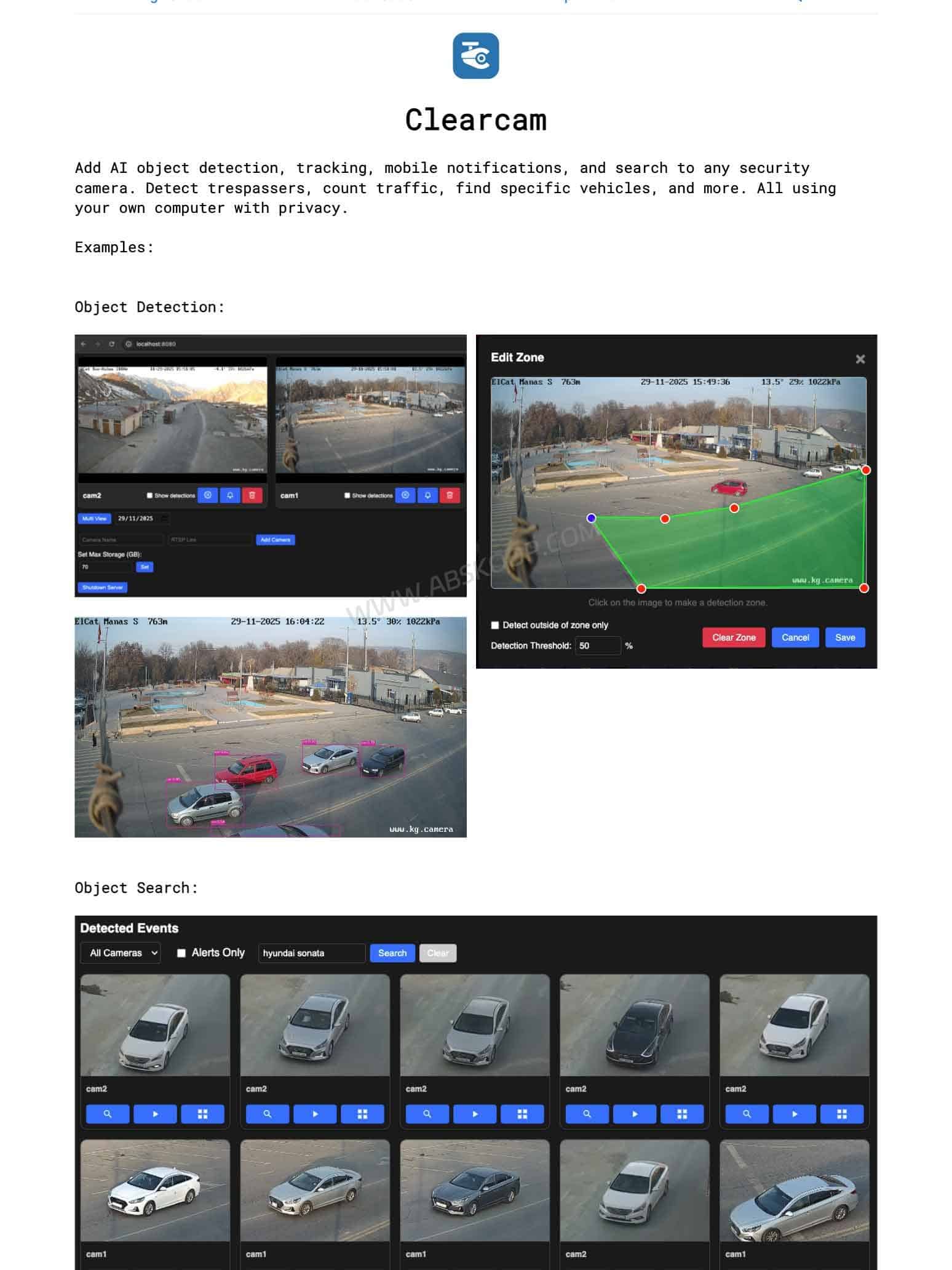
What Is Clearcam? An Open Source NVR for Adding Local AI to RTSP Cameras
An NVR receives video streams from IP cameras, stores recordings, and provides live viewing and playback. Clearcam adds local AI processing on top of those basic NVR functions.
Beyond recording and playback, Clearcam can handle:
- AI object detection;
- object tracking;
- recorded video search;
- mobile event notifications;
- remote live camera viewing;
- remote access to event clips;
- AI-generated notification summaries.
Clearcam now includes AI notification summaries powered by Qwen3 VL. Earlier releases also added search by similar images and image uploads, giving it more ways to find a person, vehicle, or other detected object without relying entirely on a timeline.
As of October 2026, the Clearcam GitHub repository has roughly 2.1K stars and more than 200 forks. The project is released under the GPL-3.0 license.
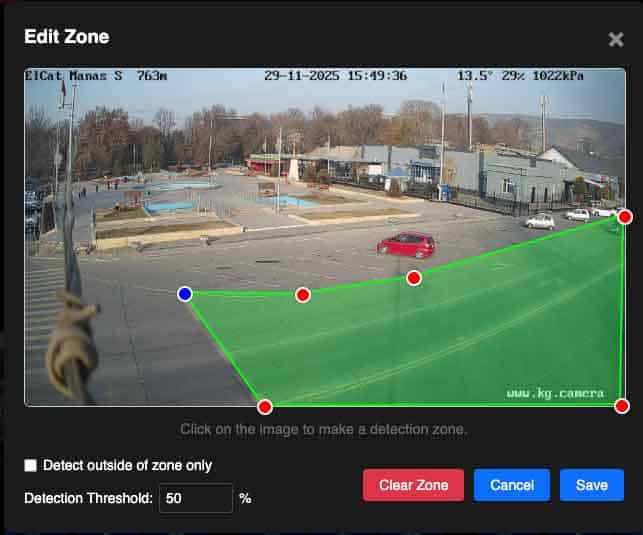
Which Cameras Work with Clearcam? RTSP Is the Key
The main camera requirement is RTSP.
If your camera exposes an RTSP stream and the machine running Clearcam can reach it over the network, Clearcam can use that video feed for recording and AI processing.
That makes it a better fit for standard IP cameras, home security cameras with RTSP support, and existing surveillance systems built around open network streams. The camera can keep doing the actual capture while Clearcam handles detection, tracking, and search.
A camera that only works through a proprietary vendor app and does not expose an RTSP stream cannot be added in the same way.
If you plan to build a self-hosted NVR later, RTSP support is worth checking before buying cameras. Resolution and night vision matter, but an open video stream also determines whether the camera can work with software such as Clearcam or Frigate.
What Can the Local AI Do? Detection, Tracking, and Video Search
1. Detect and Track Objects in Camera Feeds
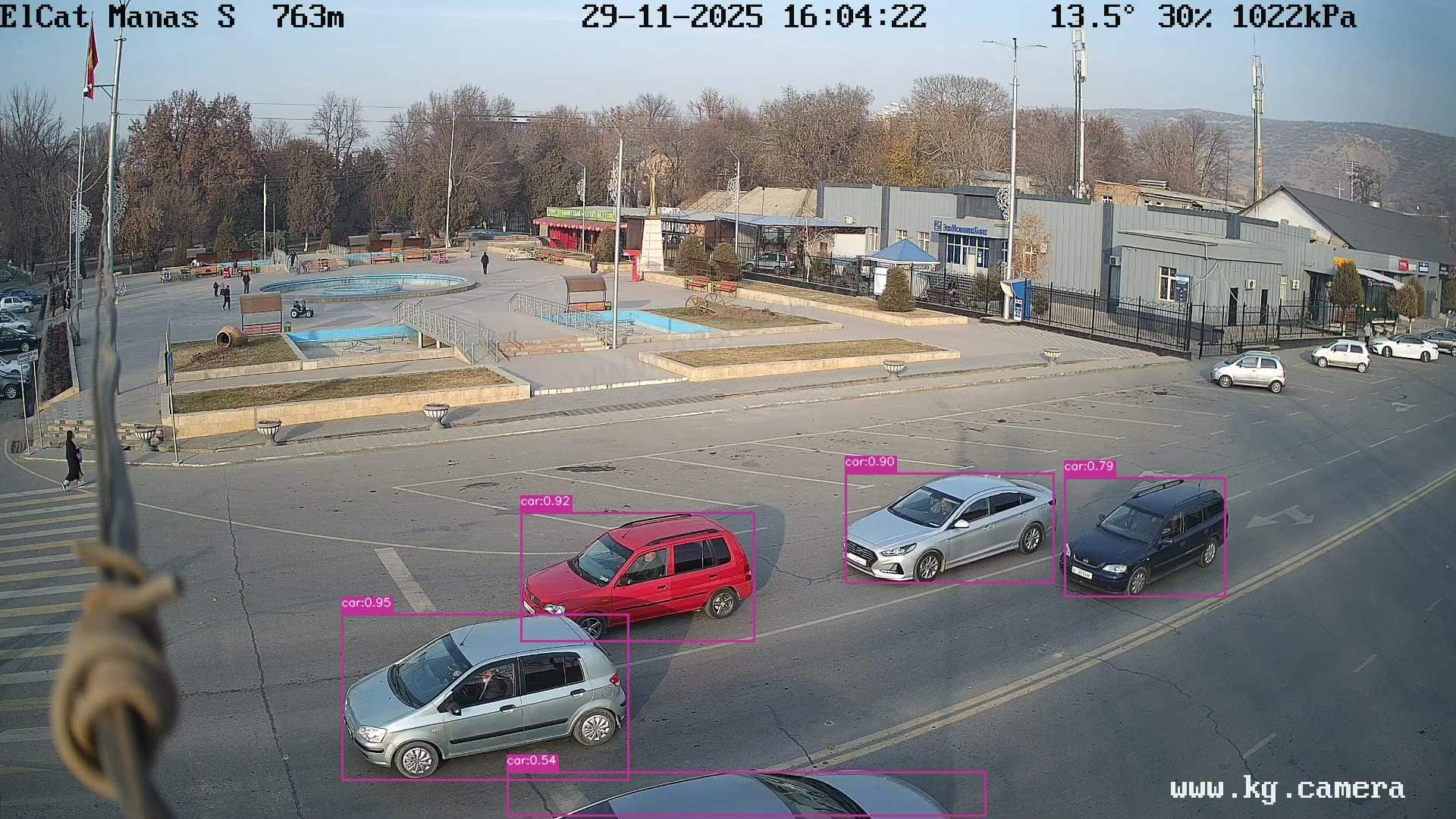
Clearcam runs AI inference on incoming camera footage to identify and track objects over time.
That can include spotting someone entering a monitored area, following a vehicle through the frame, or keeping track of an object after it stops moving.
This is different from basic motion detection. Motion detection only knows that pixels changed. AI object detection can identify what caused the change, which makes events and notifications more useful.
2. Search Recorded Security Camera Footage
Video search is one of Clearcam’s more useful features.
With a traditional NVR, finding an old event often means remembering roughly when it happened and scrubbing through the timeline until you find it.
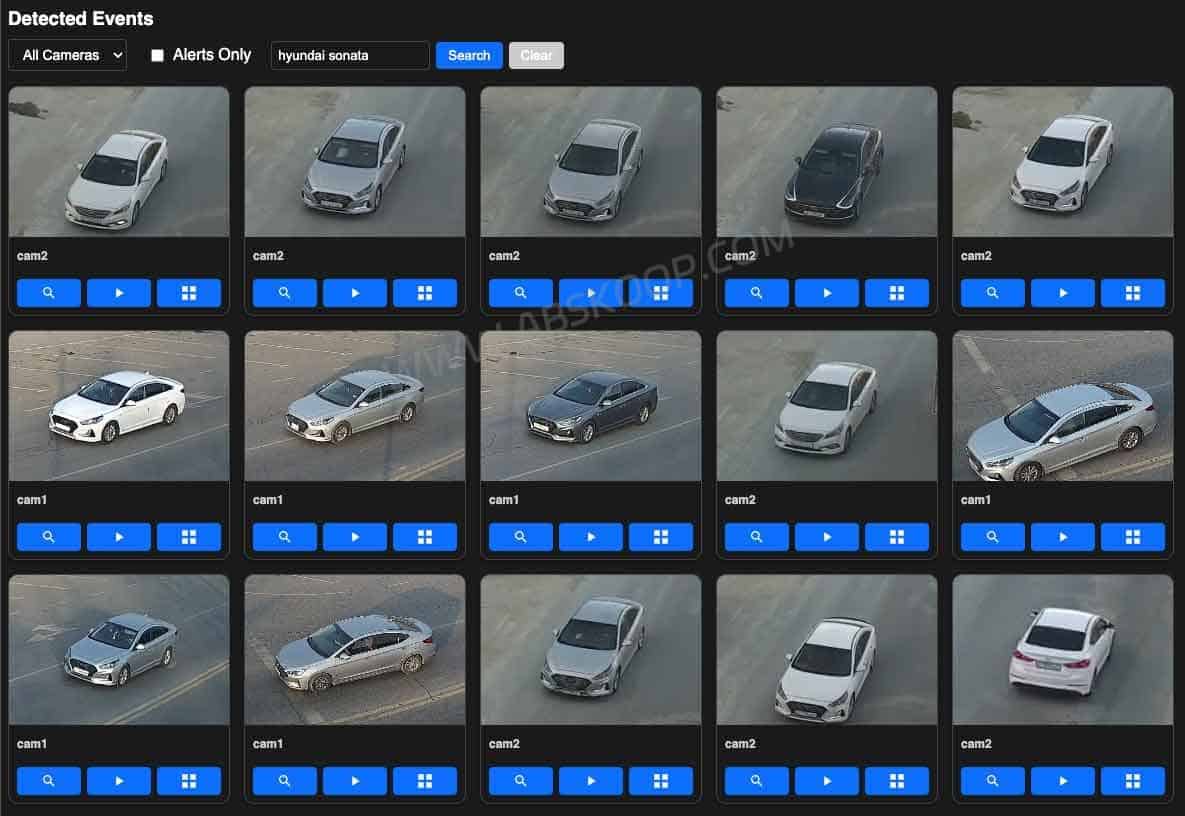
Clearcam supports search by similar images as well as image uploads. If you have a screenshot of a vehicle, for example, you can use it to look for similar detections in previous footage.
That becomes more useful as the amount of stored video grows, because searching for an object is often faster than manually reviewing hours of recordings.
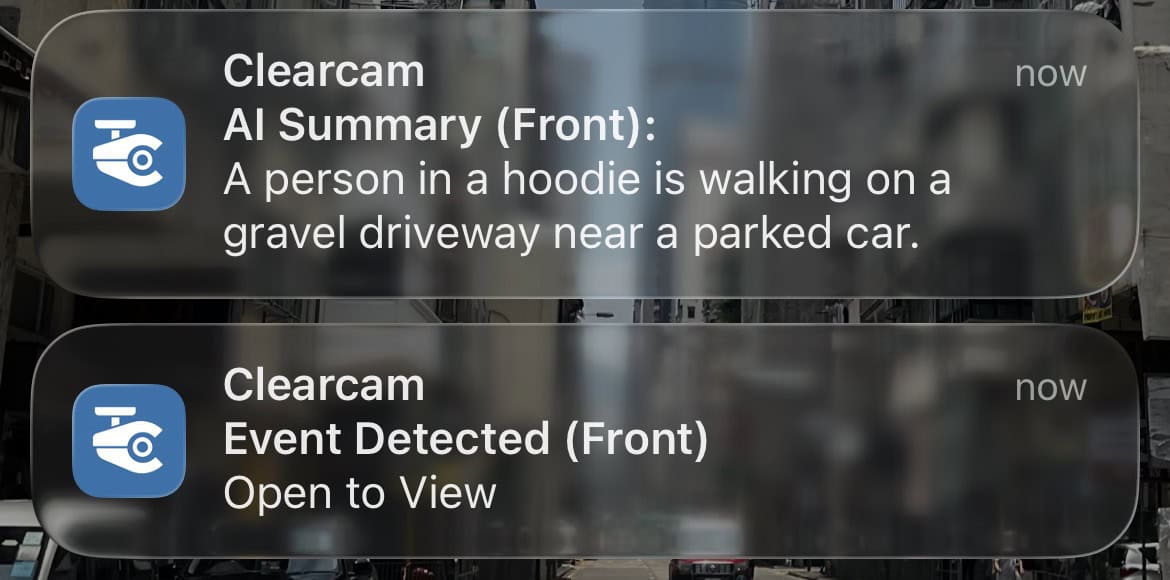
3. AI Notification Summaries
Clearcam also supports AI Notification Summaries using Qwen3 VL.
Instead of sending only a basic alert such as “person detected,” the vision model can analyze the event frame and generate a short description of what happened.
This requires more compute than ordinary object detection, so performance will depend on the GPU, model size, and machine running Clearcam.
Is Clearcam Fully Local?
Clearcam can run its NVR and AI inference on your own computer, but not every feature is completely offline.
Receiving RTSP streams, processing detections, and handling recordings can be done locally. Remote live viewing, mobile event notifications, and remote access to event clips are part of Clearcam Premium and use Clearcam’s servers and cloud storage.
The project states that Premium data uses end-to-end encryption, but the remote service itself still involves cloud infrastructure.
If you do not want to use the default notification path, Clearcam also lets you change the notification URL. You can connect it to Home Assistant, Pushover, n8n, or your own service while keeping the AI processing on your local machine.
How to Install Clearcam: Python, FFmpeg, and Docker Support
Clearcam currently runs directly as a Python project rather than shipping with an official Docker Compose setup.
The machine needs Python 3.11 or later and FFmpeg, while the inference stack is built around tinygrad. Mac and Linux are currently the better-supported environments. Windows is still marked with an FFmpeg-related issue in the project documentation.
The basic startup process is straightforward: install the packages from requirements.txt, run clearcam.py, then open localhost:8080 in a browser.
If the system has an AMD or Nvidia GPU, Clearcam also provides DEV=AMD and DEV=NV options to make sure inference is using the GPU instead of falling back to the CPU.
There is currently no official Docker Compose deployment path. That matters if you normally manage self-hosted services through Docker on a NAS, Proxmox server, or Ubuntu host, because upgrades and migrations will require more manual work than a container-first project.
Clearcam vs Frigate: Which Open Source AI NVR Fits Better?
Frigate is the obvious comparison if you are building a self-hosted NVR with local AI.
Clearcam even addresses the comparison on its own website. Its goal is to reduce setup complexity and make better use of local GPU compute.
The two projects are at different stages, though.
Frigate has grown into a more complete local AI NVR platform with Docker-based deployment, an official Home Assistant integration, multi-camera workflows, and broader hardware acceleration documentation. Clearcam is still moving quickly and keeps its focus narrower: connect existing RTSP cameras, then add detection, tracking, search, and remote access.
| Comparison | Clearcam | Frigate |
|---|---|---|
| Installation | Primarily runs from Python source | Docker-based deployment |
| Local AI | Object detection and tracking | Local detection with a broader configuration system |
| Video search | Similar-image and uploaded-image search | Semantic Search |
| Home Assistant | Can send notifications to Home Assistant | Official integration available |
| Hardware acceleration | Focuses on AMD and Nvidia GPU options | Broader documented hardware support |
| Project maturity | Still evolving quickly | Larger documentation and integration ecosystem |
Frigate documents hardware-accelerated video decoding across Intel, AMD, Nvidia, Raspberry Pi, and community-supported Rockchip platforms. Its Home Assistant integration is also a dedicated integration rather than only a notification endpoint.
Search is no longer a Clearcam-only advantage either. Frigate’s Semantic Search creates local embeddings for tracked objects and can search them with text or images. Jina AI CLIP models are among the supported options.
The bigger difference is therefore deployment and ecosystem rather than whether either project has AI search.
If your main goal is adding an AI layer to RTSP cameras you already own, Clearcam is relatively direct. If you are building a complete long-term self-hosted camera system around Docker, Home Assistant, and a wider range of acceleration hardware, Frigate has more infrastructure around it.
What Are Clearcam’s Current Limitations?
Windows still has an FFmpeg compatibility issue, so Mac and Linux remain easier places to run Clearcam.
Deployment is also still Python-first, with no official Docker Compose setup. That makes long-term maintenance less convenient for people who manage everything through Docker, NAS platforms, or home servers.
Remote viewing and official mobile notifications are Premium features and use Clearcam’s servers and cloud storage. Frigate also currently has the larger ecosystem around Home Assistant, hardware acceleration, and community documentation.
Do You Need to Replace Your Existing NVR?
Not necessarily.
Clearcam’s FAQ specifically says it can run alongside an existing Hik-Connect setup, and the project recommends keeping the existing NVR for redundancy.
That makes a parallel setup practical: let the current camera system and NVR continue recording as usual, while Clearcam reads the same RTSP streams for object detection, tracking, and search.
This is especially useful if you already have working cameras and a spare Mac, Linux machine, or home server. You can test the AI features without rebuilding the entire surveillance system around a newer project.
If you later want to move everything into a fully self-hosted stack, you can then decide whether Clearcam still covers what you need or whether Frigate’s Docker, Home Assistant, and hardware support make more sense.
Frequently Asked Questions
Is Clearcam free?
The core software is free to run. Remote viewing and mobile notifications through the official apps are Premium features because they use Clearcam’s servers and cloud storage.
Which cameras does Clearcam support?
The key requirement is an RTSP video stream that the Clearcam host can reach. Cameras that only work through a proprietary app and do not expose RTSP cannot be connected in the same way.
Does Clearcam support Docker?
There is currently no official Docker Compose deployment in the main setup instructions. Clearcam is primarily run from Python source.
Does Clearcam support Windows?
Windows is not currently as straightforward as Mac or Linux because of an FFmpeg-related compatibility issue. Windows users may need to troubleshoot the environment themselves.
Clearcam or Frigate: which one should you use?
Clearcam makes sense if you mainly want to add local detection, tracking, and video search to existing RTSP cameras without building a larger surveillance stack first.
Frigate is a stronger fit if you already use Docker and Home Assistant or need broader hardware acceleration, multi-camera configuration, and a more established deployment ecosystem.
Does Clearcam upload security camera footage to the cloud?
The local NVR and AI inference can run on your own machine. Clearcam’s official Premium remote viewing, event clips, and mobile notifications use its servers and cloud storage.
Project links:
Clearcam website|GitHub


Comments (0)