



ImgAI (Image AI) is a browser-based AI image and video workspace for generating images, editing photos, creating product visuals and making short videos.
The service was rebuilt on September 15, 2026. Image generation, results and follow-up edits now live in the same workspace, and an existing result can be reused as a reference for the next edit or generation.

What is ImgAI?
ImgAI runs in the browser, so there is no desktop app to install before you can start.
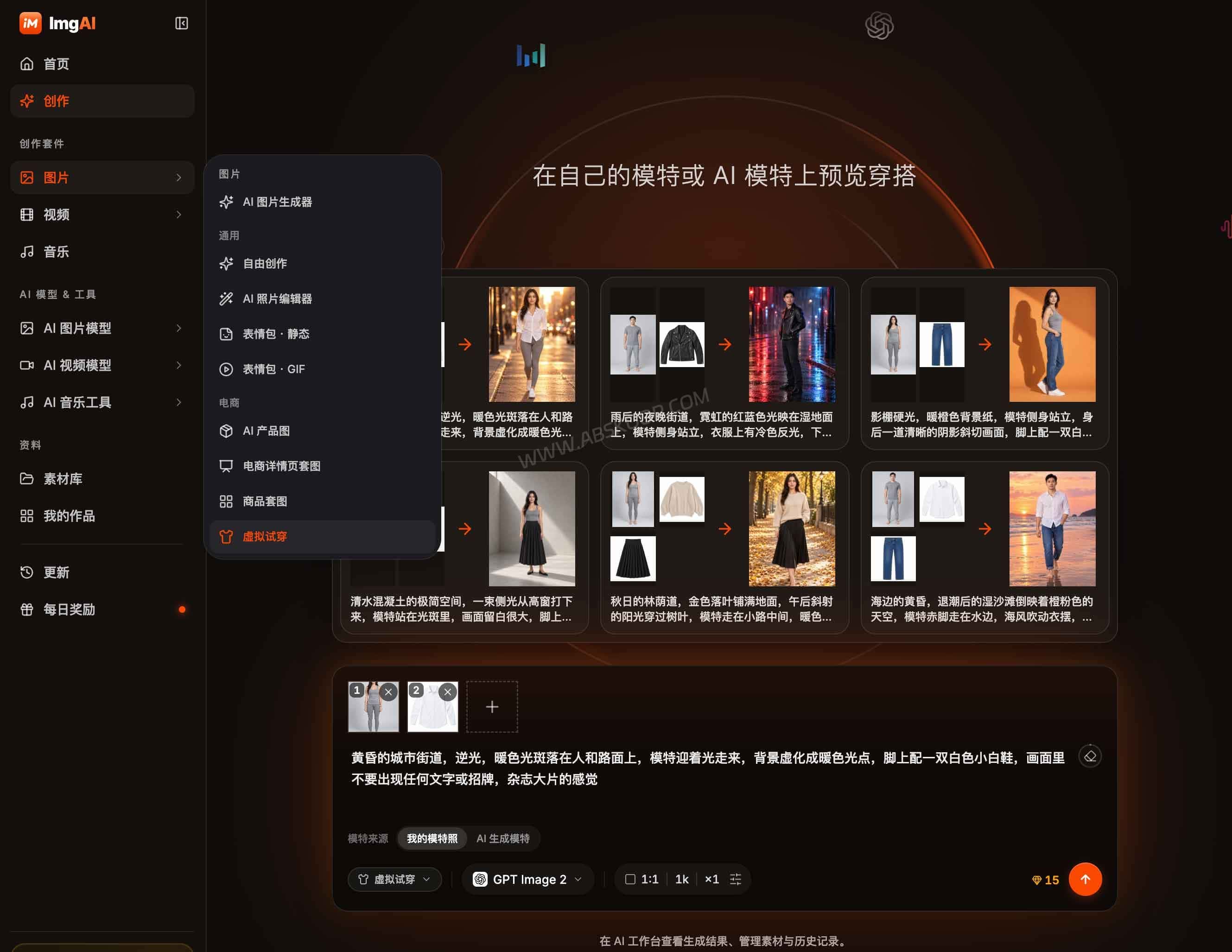
The current workspace covers six main image workflows: freeform creation, AI photo editing, AI product photography, e-commerce detail-page sets, product image sets and virtual try-on.
Video tools are built into the same service. Depending on the model, you can start from text, an image, reference materials or first and last frames.
That makes ImgAI more useful for someone who needs several kinds of visual content than for someone looking for a single-purpose image generator.
Which AI image and video models does ImgAI support?
ImgAI works more like a multi-model workspace than a tool built around one AI model.
As of October 2026, the image side includes GPT Image 2.5, GPT Image 2, Nano Banana 2, Nano Banana Pro, Nano Banana and FLUX.1 Schnell.
For video, the current lineup includes MiniMax H3, Seedance 2.5 and Seedance 2.0.
The models differ in reference-image support, resolution, video length and credit cost. ImgAI shows the cost before you start a generation, which matters because the gap between a quick image and a video job can be large.
At the default settings, some examples are:
- GPT Image 2.5: 13 credits
- Nano Banana 2: 25 credits
- Nano Banana Pro: 48 credits
- FLUX.1 Schnell: 0 credits, subject to the free-use quota
- MiniMax H3: 408 credits for the default 5-second video
- Seedance 2.5: 687 credits for the default 5-second video
Changing resolution, duration or reference inputs can change the final cost.

Is ImgAI free? How does pricing work?
You can try ImgAI without paying. The current free tier allows 10 image generations per day without an account.
Registered users can also collect daily check-in credits. A complete seven-day streak adds up to 100 credits.
Images and videos use the same credit balance, but they do not cost anywhere near the same amount. A basic image can be cheap or free, while a short video may use hundreds of credits. The useful part is that ImgAI shows the cost before you run the job, so you can decide whether it is worth using that model.
The current yearly plans are:
- Basic: $119/year with 86,000 credits
- Pro: $287/year with 230,000 credits
- Max: $575/year with 524,000 credits
- Ultra: $1,151/year with 1,152,000 credits
All four paid plans currently include private generation, and ImgAI also offers separate credit packs.
Sign-up bonus credits may change, so I would treat them as an extra rather than something to include when comparing the long-term cost of the plans.
Can you safely upload client photos and product assets?
For ordinary test images, there is not much to think about. Client photos, unreleased product shots, design files and other sensitive material deserve more care.
Some ImgAI jobs are processed by third-party model providers such as Google and OpenAI. That means reference images, prompts and other inputs needed for a generation may be sent to the selected model provider rather than staying entirely inside ImgAI.
Paid plans support private generations, but “private” mainly controls whether the finished work is publicly displayed. It does not mean the generation happens locally or that the input never leaves ImgAI.
If the material contains customer data, identity documents, confidential designs or internal company assets, check whether sending it to a third-party AI provider is acceptable before uploading it.
What changed in the 2026 version of ImgAI?
ImgAI launched its rebuilt version on September 15, 2026.
The new workspace keeps generation, results and further editing on one screen. It also puts more emphasis on product photography, e-commerce image sets, virtual try-on and AI video generation.
The account system changed as well. Old accounts do not automatically carry over, so existing users need to register again.
If the new account uses exactly the same email address as the old one, unused credits from the previous account should transfer within 24 hours. If they do not, ImgAI asks users to contact [email protected].

Does ImgAI still offer AI face swap?
The older Image AI site did include dedicated image and video face-swap tools.
The rebuilt ImgAI workspace no longer lists face swap as one of its main creation workflows, and the old face-swap page is no longer available.
If face swapping is the main reason you are looking at ImgAI, it is no longer the clearest tool for that job. The current product is much more focused on AI image generation, photo editing, product visuals and video creation.
If you specifically need face swapping, a dedicated face-swap tool will usually make more sense than choosing ImgAI for that single task.
Can ImgAI be used commercially?
ImgAI allows both personal and commercial creative work, but that does not automatically make every generated asset safe to use commercially.
Your rights can still depend on the terms of the underlying model and on the material you upload.
For example, if you use a company logo, a real person’s likeness or a third-party product image, you still need the appropriate rights or permission to use that material.
So there is an important difference between “ImgAI permits commercial use” and “every output is automatically cleared for commercial use.”
Who is ImgAI best for?
ImgAI makes the most sense if your work regularly moves between image generation, photo editing, product visuals and short-form video.
E-commerce sellers and content teams are likely to get more value from the product-shot, product-set and virtual try-on workflows than someone who only wants to generate the occasional image.
For light image generation, the free model and daily quota are enough to see whether the workflow fits. For frequent video generation, check the credit cost first because video models can burn through a balance much faster than image models.
ImgAI is less suitable when your work involves confidential client assets or internal material that cannot be processed by third-party AI providers.
ImgAI FAQ
Do I need to install ImgAI?
No. ImgAI is a web-based service and runs directly in a browser.
Can I use ImgAI without creating an account?
Yes. The current free model allows up to 10 image generations per day without registration. An account is required for paid models, credit balances and subscription features.
Does ImgAI support private generation?
Yes. The current paid plans include private generation.
Private generation keeps the finished work from being shown publicly, but the inputs required for the job may still be processed by the selected third-party model provider.
ImgAI official website
Website: https://imgai.ai


Comments (0)