



Looking for a Douyin video downloader on iPhone without installing another app? “Douyin All Types” (抖音全类型) is a third-party iOS Shortcut that can read a shared Douyin link and try to extract the video along with other media attached to the page.
It is not limited to video. Depending on the post and the current version of the Shortcut, it can also provide options for background audio, video covers, music artwork and creator profile images.
In short: this is a Douyin download and media extraction tool that runs inside Apple Shortcuts on iPhone and iPad. It relies on Douyin sharing links and third-party parsing rules, so some features may stop working when Douyin changes its page structure.
What Is the Douyin Video Downloader Shortcut?
“Douyin All Types” is a community-made iOS Shortcut rather than an official Douyin feature.
The workflow is simple: copy the share link of a Douyin post, run the Shortcut, and let it check the link for available media. If the link can be parsed, the Shortcut displays the resources it finds and lets you choose what to save.
For people who only need to download an occasional Douyin video, audio track or cover image, this avoids installing another dedicated downloader app. The trade-off is reliability: because it depends on Douyin’s current link and page structure, an older version of the Shortcut may stop working without warning.
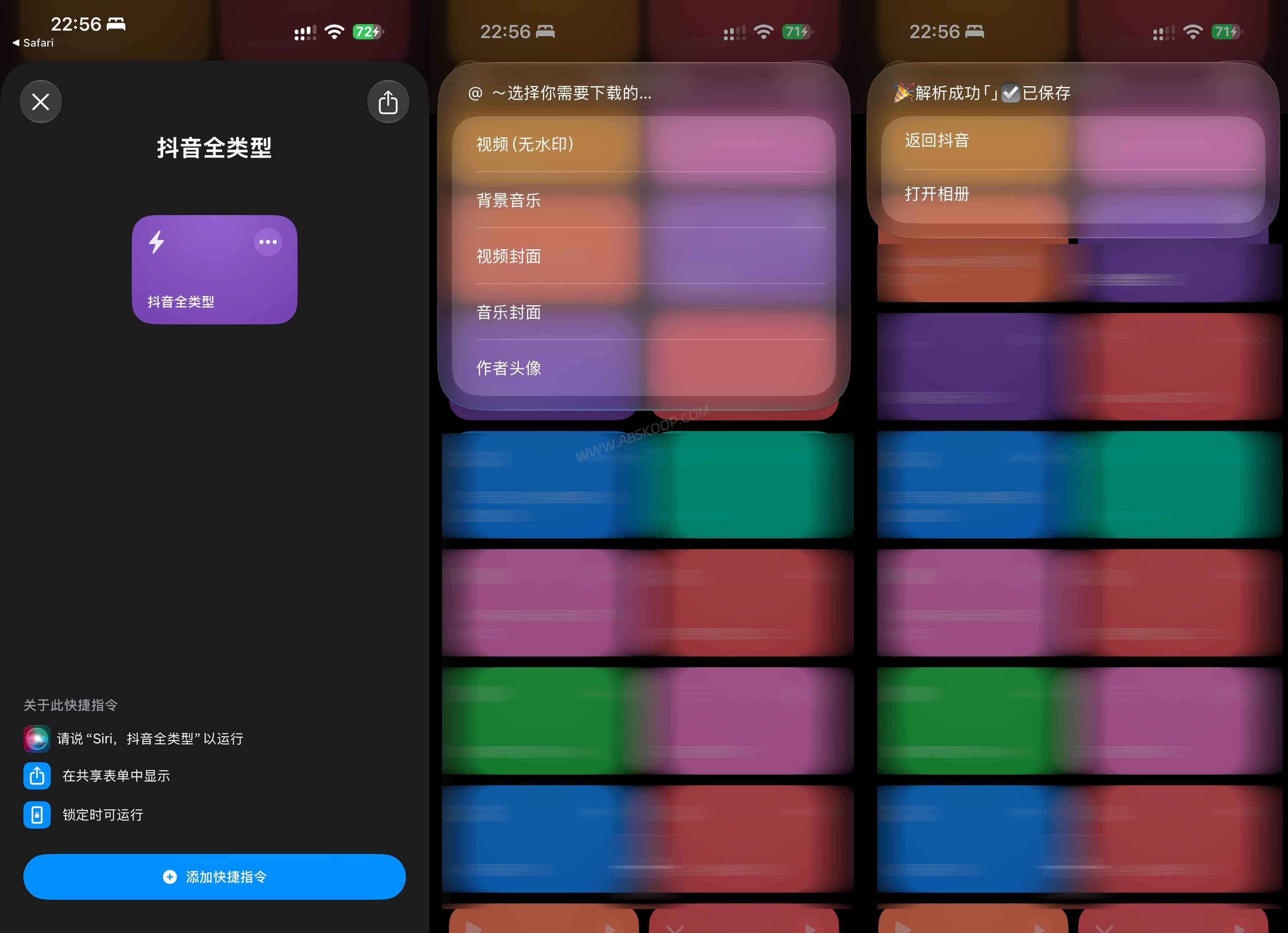
What Can the Douyin Shortcut Download?
Douyin All Types can try to extract several types of media from a supported Douyin share link:
- Douyin videos
- Background audio
- Video cover images
- Music artwork
- Creator profile images
The available options depend on the individual Douyin post and the version of the Shortcut you are using. Some links may expose only part of this content, so it should not be treated as a downloader that works with every Douyin post.
How to Use the Douyin Video Downloader on iPhone
Open Douyin and find the post you want to work with. Use the Share menu to copy its link.
On your iPhone or iPad, open and run the “Douyin All Types” Shortcut. It reads the Douyin URL from the clipboard and, when parsing succeeds, shows the media options it can detect.
Select the video, audio, cover or other item you want to save and follow the prompts shown by the Shortcut.
The first time you run a third-party Shortcut, iOS may ask for access to the clipboard, Photos or network connections. Review each permission when it appears and only allow access that is required for the Shortcut to run.
Download the Douyin All Types Shortcut
The Shortcut is available through Apple’s iCloud Shortcuts service: https://www.icloud.com/shortcuts/a784512951ae4989ad801ac0bb3d6579
Open the link on an iPhone or iPad and add the Shortcut to the Apple Shortcuts app.
Keep in mind that third-party Douyin download Shortcuts can stop working after Douyin changes its sharing format, page parameters or media URLs. If the Shortcut still launches but can no longer parse a video, the problem may be the parsing rules rather than your iPhone.
Why Is the Douyin Downloader Not Working?
The most common issue with this type of Shortcut is compatibility. Douyin can change how shared links or media resources are delivered, while the Shortcut may still be using an older parsing method.
If a link fails, check that it opens normally in a browser or in Douyin, copy the share link again, and rerun the Shortcut.
If several valid links fail in the same way, repeatedly reinstalling the Shortcut is unlikely to fix the underlying issue. The Shortcut itself may need an update.
Can It Download Douyin Videos Without a Watermark?
The Shortcut attempts to extract video resources available from the Douyin share link. Depending on the post and the current parsing method, this may include a version without the platform watermark.
This is different from editing a downloaded video to erase or cover a watermark. The Shortcut works by parsing the media associated with the shared page rather than modifying the video frame after download.
Availability can change, so not every Douyin link will necessarily return the same result.
Limitations and Usage Notes
Douyin All Types is a third-party Shortcut and is not affiliated with or provided by Douyin. Its supported features and future availability depend on both the Shortcut’s maintenance and changes made by Douyin.
Only download or save videos that you created yourself, have permission to use, or are otherwise allowed to save under the applicable copyright terms. A third-party downloader does not change the copyright status of the original content.
FAQ
Do I need to install another app?
No. The Shortcut runs through Apple’s built-in Shortcuts app on iPhone and iPad.
Can I use it as a Douyin video downloader without watermark?
It can try to retrieve the video resource exposed through a Douyin share link, which may include a version without a watermark. Results depend on the individual link and the current version of the Shortcut.
Why did the Shortcut work before but stop working now?
Douyin may have changed its share links, page structure or media URLs. When that happens, older parsing rules inside the Shortcut may need to be updated.
Can it download audio and cover images too?
Yes, when those resources are available to the Shortcut. It can also try to extract background audio, video covers, music artwork and creator profile images.
Is this an official Douyin Shortcut?
No. Douyin All Types is a third-party community Shortcut and is not an official Douyin tool.


Comments (0)